
Known Participant
March 23, 2023
Question

How to inputing the table have a lot of rows into Framemaker?

  • March 23, 2023
  • 3 replies
  • 438 views

Hello Everyone,


I have a format for a table which the border of the header and the end of the table is bold boder.
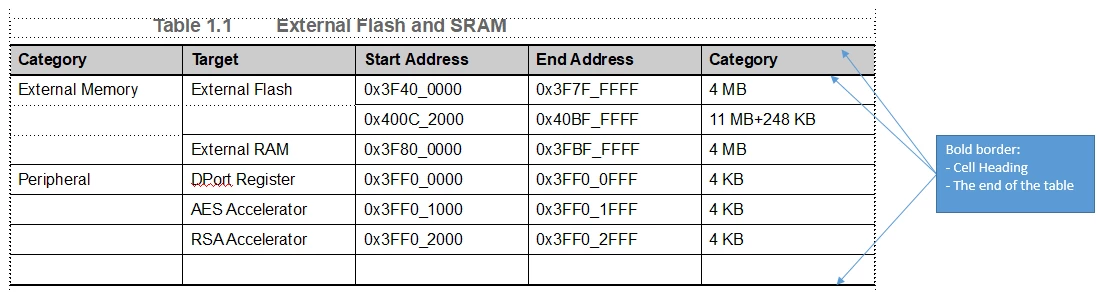
 

When i manually input for the table with little row into FM the format is no problem.
However, we have some tables that have a lot of rows so inputting each row into FM is a terrible job.

I also tried copying the table from excel but that lost the original properties of the table (e.g. table border)
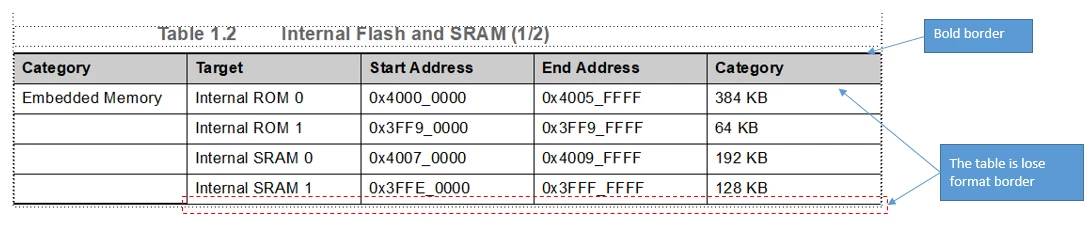
 

So how to inputing the table have a lot of rows into Framemaker while keeping the original format of the table in Framemaker, and at the saving time?

This topic has been closed for replies.

3 replies

Dave Creamer of IDEAS
Community Expert
Community Expert
March 24, 2023

When I have complex data in Excel, I like to save it as a tab-delimited or csv file, then import into Frame. Frame will give you the option to convert the data to a table, apply a table style, and apply header/footer rows.


David Creamer: Community Expert (ACI and ACE 1995-2023)
Community Expert
March 23, 2023

Sounds like the table designs have an override regarding the thick line below the heading. I would recommend you buy Frameexperts small utility "Table Cleaner". It has save me lots of hours fixing tables!

https://frameexpert.com/store/index.html

Bjørn Smalbro - FrameMaker.dk
Community Expert
March 23, 2023

Hi,


You can create your table in Excel and paste this table as text without formatting (Edit | Paste Special). Then select all this text and convert it into a table (Table | Convert to Table).

This works only, when there is only a single paragraph in each table cell.


https://help.adobe.com/en_US/framemaker/using/using-framemaker/user-guide/frm_tables_ta-text-and-graphics-in-tables_convert-between-text-and-table.html


Best regards


Winfried

Known Participant
March 23, 2023

Thank so much.

It's really helpful for me.