


Inspiring
June 17, 2014
Answered

How to insert TOC inside a table

  • June 17, 2014
  • 1 reply
  • 446 views

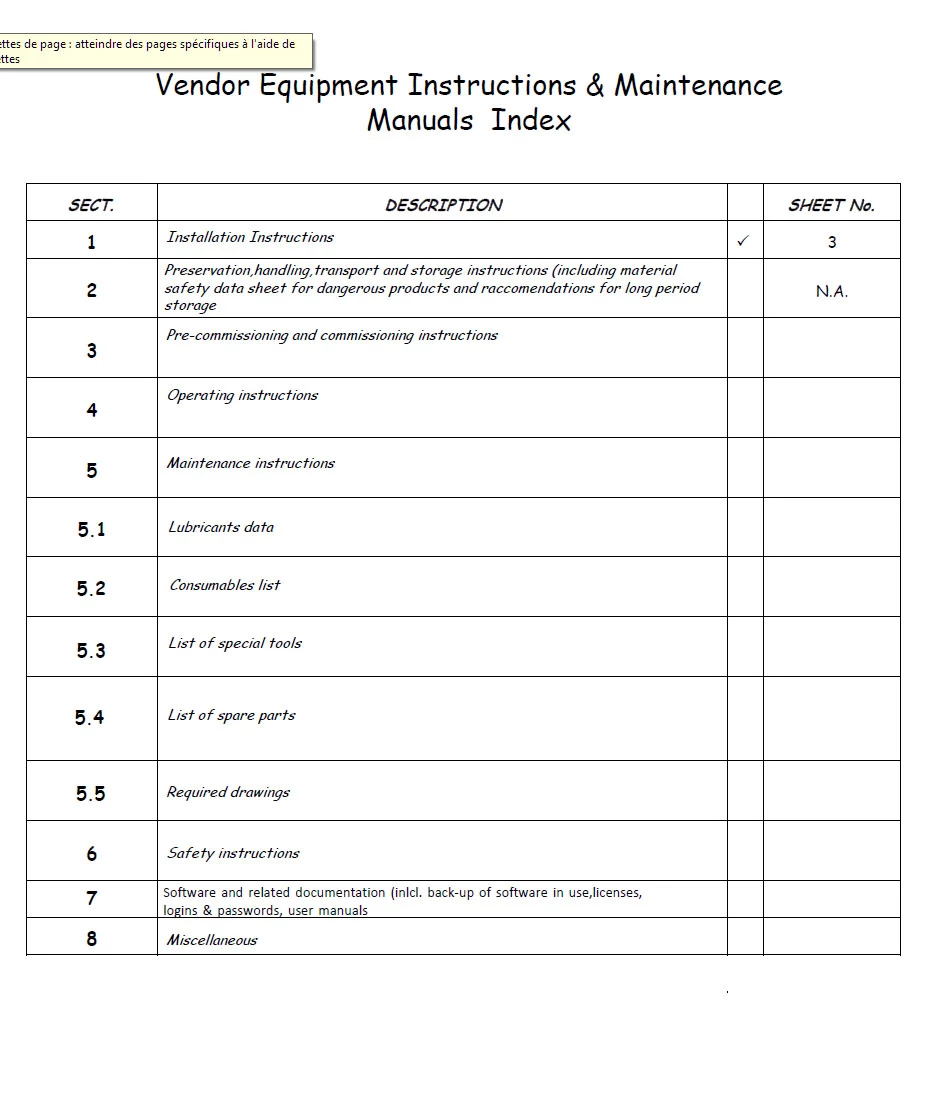
Using FrameMaker 12, I have to create a TOC inside a table. That means, 1st column must contains the paragraphs number, 2nd column the paragraphs text, 3rd column the page numbers. Of course, each element must fill each table cell. I have uploaded an example.

Thank you for your help

Nicolas
    This topic has been closed for replies.
    Correct answer Arnis Gubins

    Create a TOC in the normal manner and use tabs as separators between the section number, <$paratext> and page number.

    Then use FM's convert to table utility to convert the TOC to a table using the appropriate Table design from your catalog.

    It's a manual and you will have to redo this every time you update the table, but it should only take a few clicks to do. Automating the steps with a script would make it even less painful.

    1 reply

    Bob_Niland
    Community Expert
    Community Expert
    June 17, 2014

    Presumably you want this TOC to be "generated". I doubt that FM's standard TOC generation capability can do that.

    For a small TOC, I would just create cross-references, by hand, from the table to the para tags to be listed. We do this routinely for local see-also tables in various manuals.

    For a larger TOC, or one whose content is apt to change often (other than just page numbers), I'd consider faking it. Have the xxxTOC.fm file sport Master Pages with ruled borders that mimic a table, and set the zzzTOC paragraph formats to ensure constant vertical spacing between them, so that on the Body pages, the auto-generated TOC content appears to sit in a table.

    The MP rules could just be the vertical lines. The horizontals could be defined by Advanced > Frame Below on each TOC paragraph format. Without careful planning, and perhaps some dummy paras, this would be likely to leave hanging verticals or gaps.

    NicPervyAuthor
    Inspiring
    June 17, 2014

    Yes I am agree with you. This is the first time that a customer asks for this kind of "stupid" layout...

    Arnis Gubins
    Arnis GubinsCorrect answer
    Inspiring
    June 17, 2014

    Create a TOC in the normal manner and use tabs as separators between the section number, <$paratext> and page number.

    Then use FM's convert to table utility to convert the TOC to a table using the appropriate Table design from your catalog.

    It's a manual and you will have to redo this every time you update the table, but it should only take a few clicks to do. Automating the steps with a script would make it even less painful.