Participant
July 30, 2024
Question

How to move the table to the left

  • July 30, 2024
  • 4 replies
  • 328 views

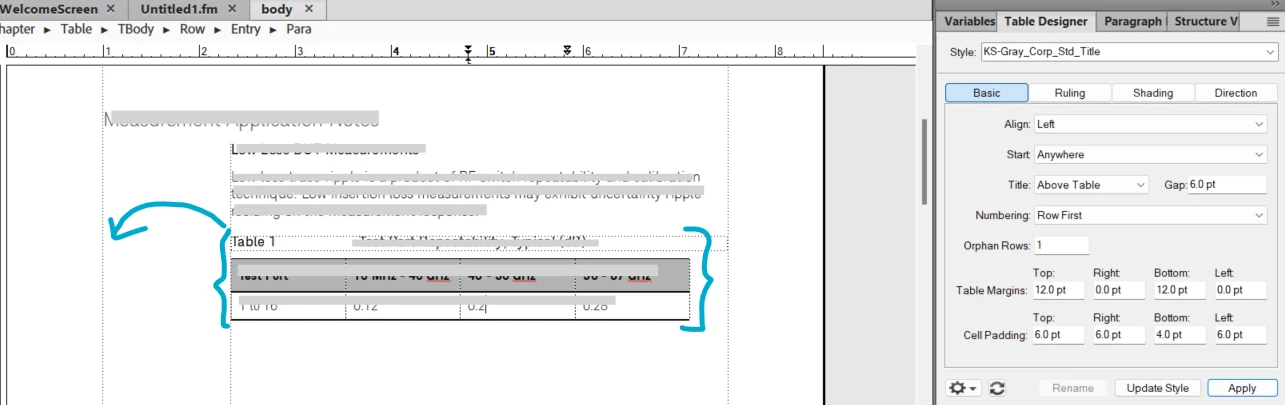
How can I move the table 1 to left as positioned in the image?

    This topic has been closed for replies.

    4 replies

    Barb Binder
    Community Expert
    Community Expert
    July 30, 2024

    Lots of good options!


    The only thing left to mention that in a sidehead layout, a table that can fit in the main column will (like yours) but if it is too wide for the main column, it will straddle the sidehead and the main column automatically. You don't need to do anything if you just make your table wider. 


    ~Barb

    ~Barb at Rocky Mountain Training
    Community Expert
    July 30, 2024

    Hi,

    There are two ways that your table moves to the left:

    o Change the pagination settings of the paragraph with the table anchor, so that it is in the sidehead area. If your table anchor is at the end of the preceeding paragraph with regular text, then place the table anchor in a separate paragraph. This is recommended anyway!

    When you do want to have empty space with the paragraph with only the table anchor, then set the table margins top to a negative value, e.g. -12 pt, and for the paragraph with the table anchor the spacing below paragraph to the same negative value. Then the table moves on top of the paragraph with the anchor.

    o When the width of the table columns exceed the width of the non-sidehead area of your text frame, then the table moves to the left as well. This does not happen, when the table width is only a very tiny bit wider than the non-sidehead area, but when it is e.g. 2 or 3 mm wider.

    Best regards, Winfried

    Community Expert
    July 30, 2024

    Beyond applying "Across all Sideheads and Columns" to the tables anchoring paragraph, the table style also have an optioin for alignment like this:

    You can find that option in the Table Designer panel.

    Bjørn Smalbro - FrameMaker.dk
    Community Expert
    July 30, 2024

    You have a page layout which uses "Sideheads". This means that you text flows in the right column, and the left space is what is called "Sidehead". You can move text, frames or tables out in the sidehead or have them span the sidehead.

    In this case you need to mark the paragraph style in which the table anchor is placed, as having the property "Across all Sideheads and Columns" like this:

    It is good idea to dedicate a paragraph style to only anchors. Anchors for Graphic Frames and Tables. This gives you much better control of the text flow and ensures you will not accidentally create havoc in your layout.

    Bjørn Smalbro - FrameMaker.dk