Inspiring
August 23, 2024
Answered

how to print on both sides

  • August 23, 2024
  • 2 replies
  • 831 views

Hello,

when I do Ctrl+P, in the windows that opens, I don't find any option to print on both sides. Why ? Is it a simple way to do that ?

This topic has been closed for replies.
Correct answer Winfried Reng

Hi,

Can you explain how you want to print?

Most people create a PDF file and print this to a physical printer. Then you can print on both sides.

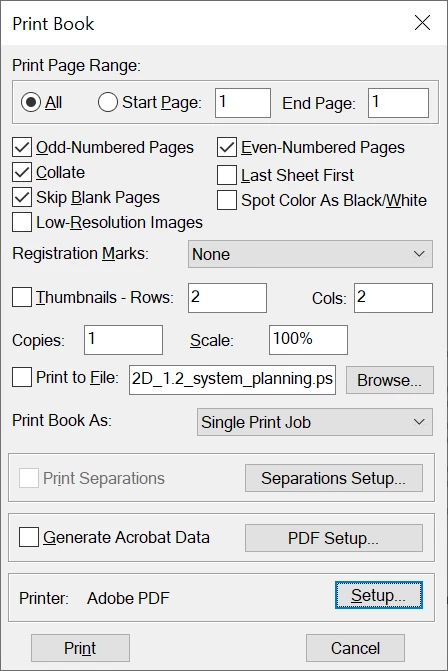
When you want to print a FrameMaker file or book to a physical printer on both sides, you have to change the printer settings. In this dialog click "Setup".

Best regards, Winfried

2 replies

Inspiring
August 23, 2024

I have just created a feature request in order to add an option in the FM print window in order to be able to print on both sides directly from the FM print window : https://tracker.adobe.com/#/view/FRMAKER-15050


Community Expert
August 23, 2024

Hi,

You can print on both sides. However, this is not a feature in the print dialog, but a printer setting. When you select a physical printer and click Setup, then you can also select double-sided printring.

Best regards, Winfried

Winfried RengCommunity ExpertCorrect answer
Community Expert
August 23, 2024

Hi,

Can you explain how you want to print?

Most people create a PDF file and print this to a physical printer. Then you can print on both sides.

When you want to print a FrameMaker file or book to a physical printer on both sides, you have to change the printer settings. In this dialog click "Setup".

Best regards, Winfried

Inspiring
August 23, 2024

Hi Winfried,

As sometimes I need to have a print one one side, and sometimes on both sides, my goal would be to print directly from the FM print window (without creating a PDF, and without going in printer settings).

For the moment I will create a PDF then print it on both sides, but I am wondering about asking a feature request for that function.