


Community Expert
July 23, 2026
Answered

How to register FrameScript to a FrameMaker installation on Windows 11

  • July 23, 2026
  • 2 replies
  • 26 views

Hi,

I have a new laptop with Windows 11 and want to install also FrameScript.

The first part works: Downloaded FrameScript from here: https://framescr.com/wb/downloads.html

Then installed it as Administrator.

And then I got a list with all FrameMaker installations (in my case only FM 18).

(This is just RegEsl7A.exe. I ran it also separately as Administrator.)
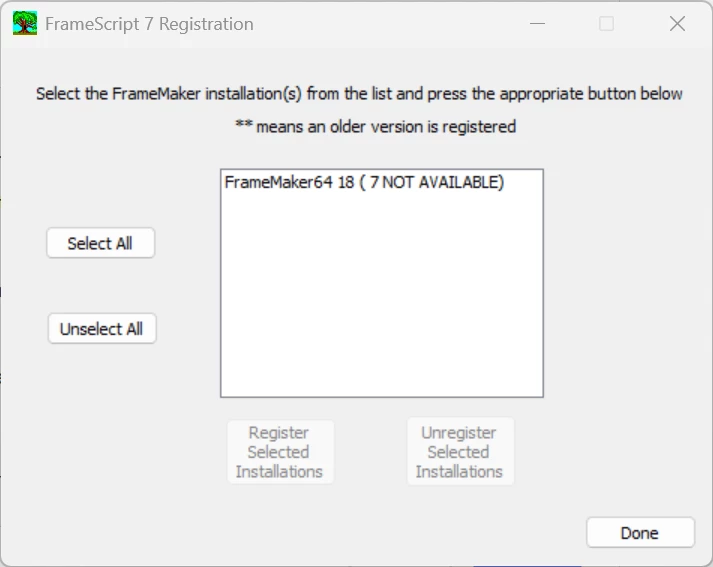
However, I cannot select FrameMaker 18.

The other buttons (Select All, Register Selected Installations) cannot be clicked.

What could I do?

On my old laptop with FrameMaker 18 on Windows 10 this had worked.

Best regards, Winfried


    Correct answer Winfried Reng

    Rick suggested to add this line to the maker.ini:

    [APIClients]
    fsl=TakeControl,FrameScript,c:\Program Files (x86)\ElmSoft\ElmScript7\fsl7_170_64_4.dll,all

    When I did this, I got the regular Activation dialog. When I entered the numbers, FrameScript was correctly activated.

    Rick, thank you very much for your fast help! Perfect!

    Best regards, Winfried

    2 replies

    Winfried RengCommunity ExpertAuthorCorrect answer
    Community Expert
    July 23, 2026

    Rick suggested to add this line to the maker.ini:

    [APIClients]
    fsl=TakeControl,FrameScript,c:\Program Files (x86)\ElmSoft\ElmScript7\fsl7_170_64_4.dll,all

    When I did this, I got the regular Activation dialog. When I entered the numbers, FrameScript was correctly activated.

    Rick, thank you very much for your fast help! Perfect!

    Best regards, Winfried

    Community Expert
    July 23, 2026

    And FrameScript works! Very good!

    frameexpert
    Community Expert
    Community Expert
    July 23, 2026

    Can you contact me off list? I can try to walk you through this via a web meeting. Thanks.

    www.frameexpert.com