Hi Amit:
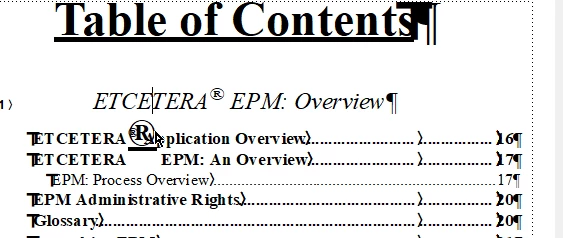
Thank you for sharing your screen shot. I see two answers to this question.
As per Jeff and Matt: when we create a new character style, we (almost) always want to choose Set Window to As Is from the Commands menu in the lower left corner of that panel (the gear icon), which makes Fm forget everything about the selection and only do exactly what you tell it. If we don't do that, the character style picks up everything from the selected paragraph (i.e., Verdana 18) and that becomes part of the style definition and that limits its use elsewhere. This is one of those things you need training to know—it's not at all intuitive for someone teaching themselves FrameMaker. You can fix this now by opening up the chapter with the title that you showed us:
- Open Character Designer
- Choose your superscript character style from the list at the top
- Commands > Set Window to As is (or tap SH F8).
- Only enable Superscript and Update Style.
- Import this character style to the other chapters in your book, including the TOC chapter.
- Update your book.
This is the right way to fix it.
If you are under a deadline, there is a quicker way: in the TOC file, open Format > Document > Text Options. Reduce the size of the superscript (i.e., 40%) and the offset (i.e., 20%). This will target all superscript characters is that one file and make them smaller and adjust their vertical position. This is quicker, but if you import document properties to the other files in your book, it will then target all superscript characters in every file, and will impact your titles, too.
~Barb




 AdChoices