
Known Participant
June 27, 2024
Answered

How to remove template name from frame maker document?

  • June 27, 2024
  • 3 replies
  • 1115 views

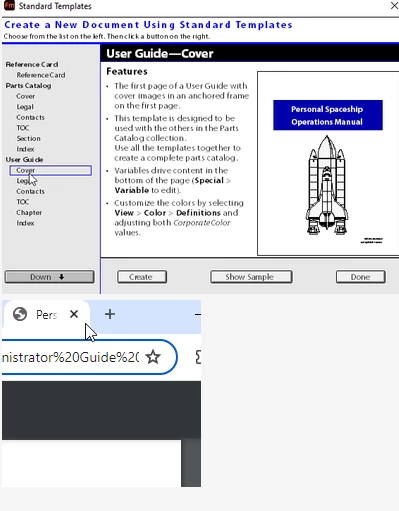
Hey, I have used an standard template "personal spaceship operational manual" for my document. When I publish pdf document, I can see the name of the template (PDF chrome). How can I remove that template name? Please guide, below are the screenshots of template and its name that I am getting in generated pdf:

 

    This topic has been closed for replies.
    Correct answer Jeff_Coatsworth

    Check to see what is present in the File Info screen of the FM file.

    3 replies

    Barb Binder
    Community Expert
    Community Expert
    June 27, 2024

    Hi Jeff!


    I hadn't heard that so just tested it. I was able to delete the field content, close and reopen and the information was gone.


    ~Barb

    ~Barb at Rocky Mountain Training
    Jeff_Coatsworth
    Community Expert
    Community Expert
    June 27, 2024

    Ah good - now that I think more about it, I think that "perpetual" File Info problem got done in one of the more recent releases (I'm still stuck on FM12, so it's just vague memories of beta versions that I've enountered).

    Barb Binder
    Community Expert
    Community Expert
    June 27, 2024

    HI Amit!


    Looks like you have completed your first project. Congratulations1


    @Jeff_Coatsworth  is correct. Those templates have metadata added that you can view/modify via the File > File Info dialog box. I would edit the Title field to one that makes sense for your product, edit/or remove the subject, web statement and for sure, Bernard's name! They will be in each file that is based on that template.


    ~Barb

    ~Barb at Rocky Mountain Training
    Jeff_Coatsworth
    Community Expert
    Community Expert
    June 27, 2024

    And if I recall correctly, there's no way to delete that info unless you enter blank spaces over the text you want to remove?

    Known Participant
    June 28, 2024

    Yes, that's correct. Existing information is not getting removed upon publishing unless I overwrite it with blank spaces. Thanks for the solution!

    Jeff_Coatsworth
    Community Expert
    Jeff_CoatsworthCommunity ExpertCorrect answer
    Community Expert
    June 27, 2024

    Check to see what is present in the File Info screen of the FM file.

    Known Participant
    June 28, 2024

    Thank you Jeff!