
4everJang
Legend
August 1, 2022
Answered

How to save as PDF from a script

  • August 1, 2022
  • 2 replies
  • 615 views

Has anyone created PDFs from an ExtendScript with FrameMaker 2020 or newer (2022 beta) ? I have tried to use the Doc.Save function with the FileType set to SaveFmtPdf but this freezes FrameMaker - after sending a couple of (for me) incomprehensible messages to the console.
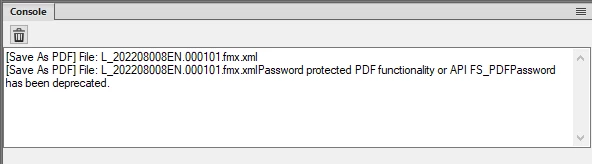
I am not aware of any password protection. When I choose Save as PDF from the File menu, the PDF is created without any issues. If there is another way (using CallClient to the Publish panel ?) I would like to know that, too. I am not stuck on any particular method, as long as I can automate the creation of PDFs.


Thanks in advance for a quick reply - especially if you have a working solution.


Jang

This topic has been closed for replies.
Correct answer frameexpert

Here is a function I use for one of my clients. It is namespaced, but you can remove it or change it.

WE_PMO.saveBookAsPdf = function (book, name) {	
    
    var params, returnParams, i;
    
    params = GetSaveDefaultParams ();
    returnParams = new PropVals ();
    
    i = GetPropIndex (params, Constants.FS_FileType);
    params[i].propVal.ival = Constants.FV_SaveFmtPdf;
	i = GetPropIndex (params, Constants.FS_PDFUseDistiller);
    params[i].propVal.ival = 0;

    FA_errno = 0;
    book.Save (name, params, returnParams);
	if (FA_errno !== 0) {
		PrintSaveStatus (returnParams);
	}
    return FA_errno;
};

2 replies

frameexpert
Community Expert
frameexpertCommunity ExpertCorrect answer
Community Expert
August 1, 2022

Here is a function I use for one of my clients. It is namespaced, but you can remove it or change it.

WE_PMO.saveBookAsPdf = function (book, name) {	
    
    var params, returnParams, i;
    
    params = GetSaveDefaultParams ();
    returnParams = new PropVals ();
    
    i = GetPropIndex (params, Constants.FS_FileType);
    params[i].propVal.ival = Constants.FV_SaveFmtPdf;
	i = GetPropIndex (params, Constants.FS_PDFUseDistiller);
    params[i].propVal.ival = 0;

    FA_errno = 0;
    book.Save (name, params, returnParams);
	if (FA_errno !== 0) {
		PrintSaveStatus (returnParams);
	}
    return FA_errno;
};

4everJang
4everJangAuthor
Legend
August 1, 2022

Thanks, Rick.


I missed the FS_PDFUseDistiller parameter (as the Save as PDF no longer uses that route) and had an error in the declaration of the return parameters array. After fixing those two issues it is working as intended. Now the only issue to solve is how to get to PDF/A-2a. It looks like I will have to do some Adobe Acrobat Pro scripting to automate that part of the workflow.


Kind regards


Jang

frameexpert
Community Expert
Community Expert
August 1, 2022

Jang, please post your code and I will take a look. Thanks.