


Inspiring
May 9, 2026
Answered

how to save my find/change settings

  • May 9, 2026
  • 4 replies
  • 65 views

Hello,

For a specific FM document, I have set some Find/change settings (with regular expression), and would like to keep these Find/change settings all the time when I re-open this specific FM document (not for new documents). How to do it ?

    Correct answer frameexpert

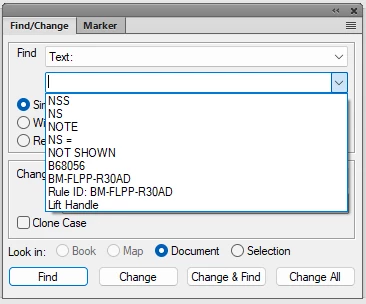
    The drop-down menu next to the text field should show your last few finds. But this is a global FrameMaker setting, not specific to a particular document. You could make a special reference page in your document to store your frequently used find strings.


    4 replies

    Matt-Tech Comm Tools
    Community Expert
    Community Expert
    May 11, 2026

    Since you asked for instructions, here is a video showing how I would solve it by adding a reference page to your template so that you can easily port the collection of strings across your library of content. For more stuff like this, see courses.techcommtools.com

    I hope this helps...


    -Matt Sullivan, FrameMaker Course Creator, Author, Trainer, Consultant
    Inspiring
    May 12, 2026

    @Matt-Tech Comm Tools 

    Thank you Matt for the video.

    frameexpert
    Community Expert
    Community Expert
    May 10, 2026

    I used to use a macro/scripting program called AutoIt, but I haven’t used it in years. It is free, so it may be worth looking at.

    https://www.autoitscript.com/site/

    www.frameexpert.com
    Inspiring
    May 10, 2026

    I have just seen that FM Find /change does not save my last setting completely :

    --  Actually I have   , (\b.+\b)

    -- If I close FM and re-open it, inside Find/change window, the last setting displayed is   (\b.+\b)   instead of    , (\b.+\b)   so it does not rememeber the begining of my last setting.


    And if I use a text expander software, it does not work : I click on the find field, then I enter my text expander shortcut, but when I click on “enter” key, nothing happen.


    Community Expert
    May 11, 2026

    Hi,

    Possibly the text expander software does not work in dialogs. Only in regular text.

    The order of the last Find text items is often not correct. When the last item is already in this list, FrameMaker does not update the order in this list. See also this Tracker report:

    https://tracker.adobe.com/#/view/FRMAKER-9850

    Is this your issue?

    Best regards, Winfried


    Inspiring
    May 11, 2026

    @Winfried Reng 

    Hi Winfried,

    In fact, my problem is different. Here are the steps I have done :

    STEPS 
    1) In the "Find" field I enter :    , (\b.+\b)
    2) I close completely FM and re-open it
    3) In the Find/Change window, for the "Find" field, in the dropdown list,  I select the setting I have done before, but I see that it is displaying  (\b.+\b) instead of   , (\b.+\b)   . So it does not remembered the begining of the setting (comma and space).
     

    frameexpert
    Community Expert
    frameexpertCommunity ExpertCorrect answer
    Community Expert
    May 9, 2026

    The drop-down menu next to the text field should show your last few finds. But this is a global FrameMaker setting, not specific to a particular document. You could make a special reference page in your document to store your frequently used find strings.


    www.frameexpert.com
    Inspiring
    May 9, 2026

    Hi ​@frameexpert 

    What about using a text expander software in order to re-use my find/change settings ? But what text expander software you advise me to test ?