
Soumya Subhra Guha
Participant
January 28, 2020
Question

How to search and replace conrefs in FrameMaker

  • January 28, 2020
  • 1 reply
  • 1125 views

I'm using FrameMaker 12 and editing a DITA map that has over 600+ topics along with several conrefs (names of our software). I need to replace these conrefs across 600+ topics (shown as Product Name in the screenshot below) with different text (for example, Adobe).
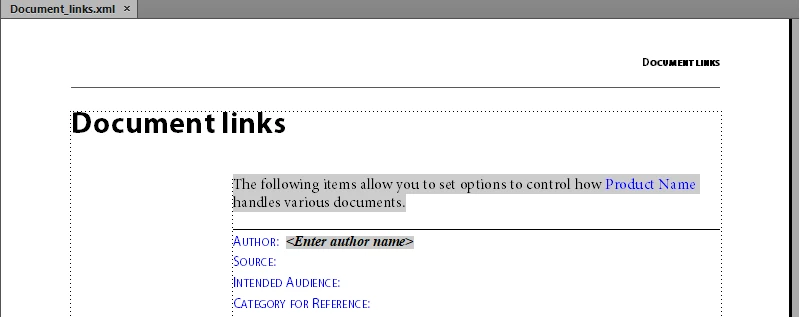
 

I tried using the Edit > Find/Change option but couldn't get it to work. Can anyone help, please?

This topic has been closed for replies.

1 reply

Legend
January 31, 2020

I was staying well out of this, since I don't [yet] use FM for my DITA documents … but seeing that no-one else has replied, I'm wondering whether you couldn't also handle this outside FM. If we can assume that the source is just DITA-compliant XML, large-scale search and replace should be a doddle in/with a text editor. Of course, you'd start by making a back-up of the original files ;-}

Soumya Subhra Guha
Participant
January 31, 2020

Thanks @FieryPantone for finally stepping in! I appreciate it. I did think about this, however, I was looking at something easier, intuitive within FrameMaker — you could say, similar in principle to a 'Find and Replace' on a text editor. It seems there isn't any.


My search (using the Edit > Find/Change option) lets me find 'plain-text' instances of the keywords (for example, Adobe FrameMaker) but doesn't locate instances of it when they occur as conrefs (the texts in blue are conrefs). You may want to check the screenshot below:


Legend
February 3, 2020

My feeling/guess/suspicion is that the content displayed by the <conrefs> doesn't quite exist: like the numbering in an ordered list. As far as I remember you can search for 1. until you're blue in the face, even when you can see it in a list-item on screen in front of you.


Looking at the screenshots, can't you just find where the original string is defined and update it there? Again, I don't know about using FM for DITA: but in one set of documents I had a separate file called (imaginatively) _conrefs.dita. So, if management decided to change the name of our AARDVARK product to PLAYTPUS, I would only need to change one line in _conrefs.dita and the job would be done.