

hadih26673991
Inspiring
April 29, 2020
Answered

How to set FM spell checker Language based on xml:lang attribute

  • April 29, 2020
  • 1 reply
  • 3502 views

I am using structured FM 2020. To create my content, I use xml format and DITA. In the xml files, I can set the xml:lang attribute to the language of that topic, e.g: <topic id="bla bla" xml:lang="de"/>, where I set the language to German. Now when I open the xml file in FM, the Language under the Font tab in the Paragraph Designer remains English, ignoring the xml:lang attribute. It means I have to manually change the Language to German.

Is there a way to tell FrameMaker spell checker to choose the language which is set in the xml file using the xml:lang attribute?
This topic has been closed for replies.
Correct answer frameexpert

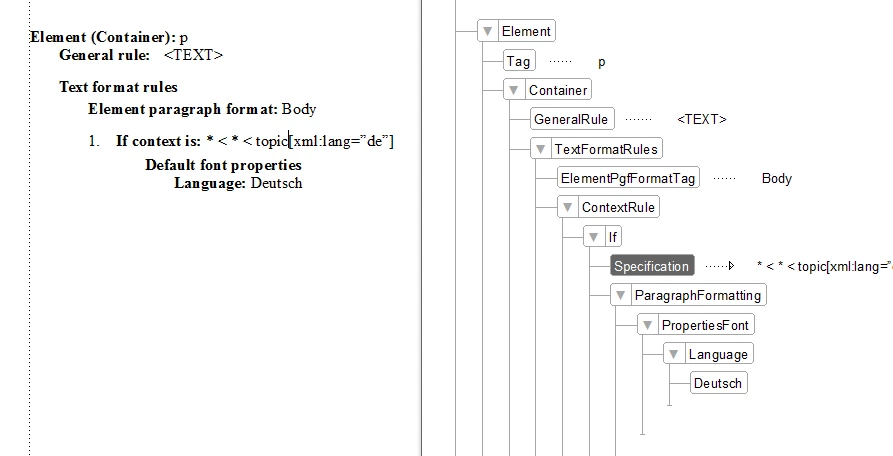
You should be able to do this with an EDD rule.

1 reply

frameexpert
Community Expert
frameexpertCommunity ExpertCorrect answer
Community Expert
April 29, 2020

You should be able to do this with an EDD rule.

www.frameexpert.com
hadih26673991
Inspiring
May 5, 2020

Thank you. I basically did what you suggested. Instead of the paragraph element, I updated the head element of the topic.edd.fm in DITA_1.3 data structure and imported it into topic.template.fm. However, that did the job only for the p element. Is it possible to apply this rule on all texts in all levels, starting from the title element?

frameexpert
Community Expert
Community Expert
May 5, 2020

I don't think so. Here is why: there are basically two ways of applying styles in an EDD. One is to call formats for element/attribute combinations and the other is to apply styling directly with EDD elements. You can mix both types in an EDD, but the FrameMaker DITA templates mainly call formats.


The advantage to the second method, applying styling with EDD elements, is that you can use inheritance. You can have a base "Body" format and have a top-level EDD rule change the language and then the rules on other elements just make changes to that format based on element/attribute combinations.


I am probably not explaining this very well, but the bottom line is that the DITA templates call formats and, as a result, you will have to apply this context rule throughout your EDD.

www.frameexpert.com