Inspiring
April 6, 2025
Answered

how to set the export to PDF

  • April 6, 2025
  • 1 reply
  • 376 views

Hello,

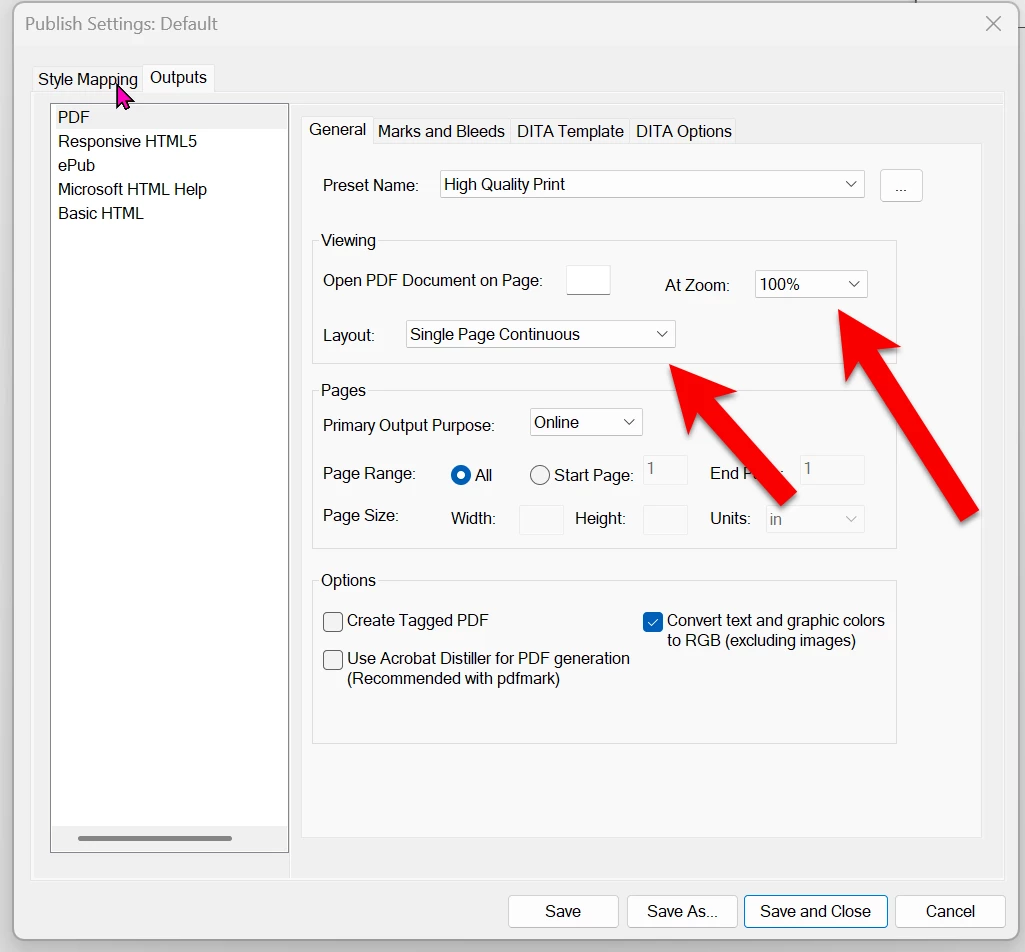
In FM I would like to set the export to PDF like this : 

1) a PDF with page scrolling (not page by page)

2) a page magnification of 100%


So by opening this PDF the user will have 100% magnification and page scrolling.


How to set it in FM ?

Correct answer Dave Creamer of IDEAS

I use the Publish panel and edit the settings. 

1 reply

Dave Creamer of IDEAS
Community Expert
Dave Creamer of IDEASCommunity ExpertCorrect answer
Community Expert
April 6, 2025

I use the Publish panel and edit the settings. 

David Creamer: Community Expert (ACI and ACE 1995-2023)
Community Expert
April 7, 2025

Hi,

Only for info.

These settings do not work, when you activate "Use Acrobat Distiller ...".

Best regards, Winfried

Jeff_Coatsworth
Community Expert
Community Expert
April 7, 2025

I would guess in that case, you'd have to set the options in a job options file and use that?