

K.Daube
Community Expert
Community Expert
December 1, 2020
Answered

How to stop Find at the end of the document?

  • December 1, 2020
  • 1 reply
  • 727 views

Dear all,

There is a flag in the Find parameters which shall stop the wrap around:


  oPropVal1 = new PropVal() ;
  oPropVal1.propIdent.num = Constants.FS_FindWrap ;  
  oPropVal1.propVal.valType = Constants.FT_Integer;  
  oPropVal1.propVal.ival = 0 ;                    // don't wrap  
  findParms.push(oPropVal1);  


I have found that a Find loops 'endless' even if this flag is used. And BTW I have no influence on this from the UI panel.

I want to create a Find procedure, which has two options:

  • Start the find at the top of the document and end it at the end of it
  • Start the find at the current location and end it at the end of the document.

→ Do You have any idea how to achieve this?

In a former project concerning Footnotes I developed a method by looping through all ¶ and checking against the starting point of the Find and the resulting Find location. But it seems that this is not reliable 
My current code is here. 


This topic has been closed for replies.
Correct answer K.Daube

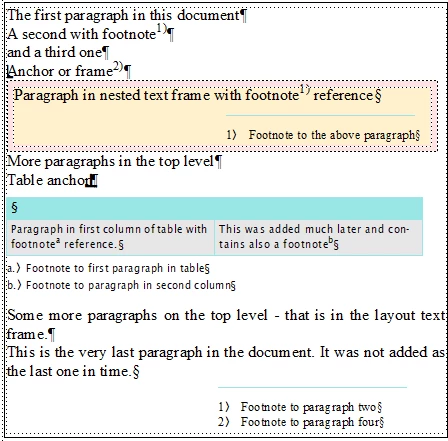
With many experiments I got some insight into this problem. I did my experiments in an aged document. Hence the various paragraphs were not created in the order the user sees them:

  • Linked list of items in flow provide an order of creation. It is clear, that when looking for paragraphs (NextPgfInFlow) you will not get footnotes.
  • Linked list of items in document (NextPgfInDoc) provide an order of creation also. Here the results are more numerous than in the first case. Looking for paragraphs also provides footnote paragraphs.
  • Find method provide the order as the user sees it. But there is a suborder depending on items in objects: When looking for any paragraph, you first come along all in the text frame, then you get those in tables and last you get those in nested text frames (text frame in anchored frame). Here I used  «Search for paragraph tag "*" with wild cards».

In this example document it is not possible at all to define an "end of search" when starting, for example after the table. The next occurrence of a searched text will appear close to the top of the document → obviously a wrap happened at the visible end of the document. This happens even if the NoWrap flag is set in the find parameters. This flag has a different purpose than what I expected from it.

Conclusion

There is no such thing as an "end of document" - it depends on the search method and the document structure. hence I must forget my idea of just searching from current location to the "end of the document".

1 reply

K.Daube
Community Expert
K.DaubeCommunity ExpertAuthorCorrect answer
Community Expert
December 4, 2020

With many experiments I got some insight into this problem. I did my experiments in an aged document. Hence the various paragraphs were not created in the order the user sees them:

  • Linked list of items in flow provide an order of creation. It is clear, that when looking for paragraphs (NextPgfInFlow) you will not get footnotes.
  • Linked list of items in document (NextPgfInDoc) provide an order of creation also. Here the results are more numerous than in the first case. Looking for paragraphs also provides footnote paragraphs.
  • Find method provide the order as the user sees it. But there is a suborder depending on items in objects: When looking for any paragraph, you first come along all in the text frame, then you get those in tables and last you get those in nested text frames (text frame in anchored frame). Here I used  «Search for paragraph tag "*" with wild cards».

In this example document it is not possible at all to define an "end of search" when starting, for example after the table. The next occurrence of a searched text will appear close to the top of the document → obviously a wrap happened at the visible end of the document. This happens even if the NoWrap flag is set in the find parameters. This flag has a different purpose than what I expected from it.

Conclusion

There is no such thing as an "end of document" - it depends on the search method and the document structure. hence I must forget my idea of just searching from current location to the "end of the document".

Legend
December 4, 2020

Hi Klaus, what happens if you do the search with the UI? If it searches endlessly, then I would expect the same behavior from the script. But if the UI stops, then I think the script should also. If so, there might be a solution, although I do not see a problem with your code.


Something to think about... I'm not sure that the "no wrap" logic has anything to do with the flow of text, order of paragraphs, etc. I think maybe FM simply remembers the text location of the first item found, then stops when it finds it again. It seems that if you alter text during a manual find, it "resets" the "no wrap" logic. I'm not 100% sure about that. But in either case, as a last resort, maybe you could do that yourself in your code. That is, store the text location of the first find and stop your loop when you get back there.


It's been a while since I did any searching with a script. Hope this helps,

Russ

K.Daube
Community Expert
K.DaubeCommunity ExpertAuthor
Community Expert
December 8, 2020

Thnak you Russ.

It seems that the incriminated flag works for find-replace. Assuming the searched object exists 3 times:

  • Searching for something - finds the first object
  • Find Next finds the next (2nd) occurrence
  • Find Next finds the next (3rd) occurrence
  • Find Next finds the next (1st) occurrence
  • ...

If I change the object at the second occurrence, then the Find-Next 'loop' stops at the next time i come round the corner to this object.