


Inspiring
November 6, 2014
Question

How to supress creation of book layer in WebHelp output?

  • November 6, 2014
  • 1 reply
  • 528 views

Hi.

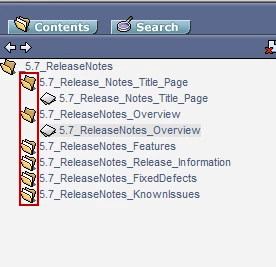
In a FrameMaker book, I have several chapters. When I publish to WebHelp, what I want to see is just each chapter turned in to its own topic. But FrameMaker does is put each topic in its dedicated book (see graphic below). What I'd like to see is one book (5.7 ReleaseNotes) and chapter-based topics beneath it. In short, I'd like to remove the intermediate book layer.

If there's a way to configure this, please advise as to how to do it. It's not clear how to do this from the settings.

Thanks!

-Kurt
    This topic has been closed for replies.

    1 reply

    Jeff_Coatsworth
    Community Expert
    Community Expert
    November 6, 2014

    This is just your ToC right? Just edit it to make it look the way you want

    kdeulerAuthor
    Inspiring
    November 6, 2014

    Jeff-  Yes, just the TOC. But what do you mean to "just edit it". What would be the tool? Skin editor? (Ideally, I'd like to not have an extra editing step every time I do FM to WebHelp.)

    Thanks!

    Jeff_Coatsworth
    Community Expert
    Community Expert
    November 6, 2014

    Oops, sorry – I missed the fact that you’re doing the Publish route directly out of FM – I’m not sure how you configure it. FM12 introduced more controls to be able to tweak the output, but my suspicion is that you may still not have the ability to mess with the resulting ToC. That’s why I’m still in the TCS camp of editing stuff in RH after bringing it in from FM.