
Participating Frequently
November 20, 2017
Answered

HTML Help: Anchored frame in text inset replaced by text image

  • November 20, 2017
  • 3 replies
  • 890 views

Who can explain this absurdity?

When I publish an HTML Help file, some pages show an image of text where an anchored frame ought to be.
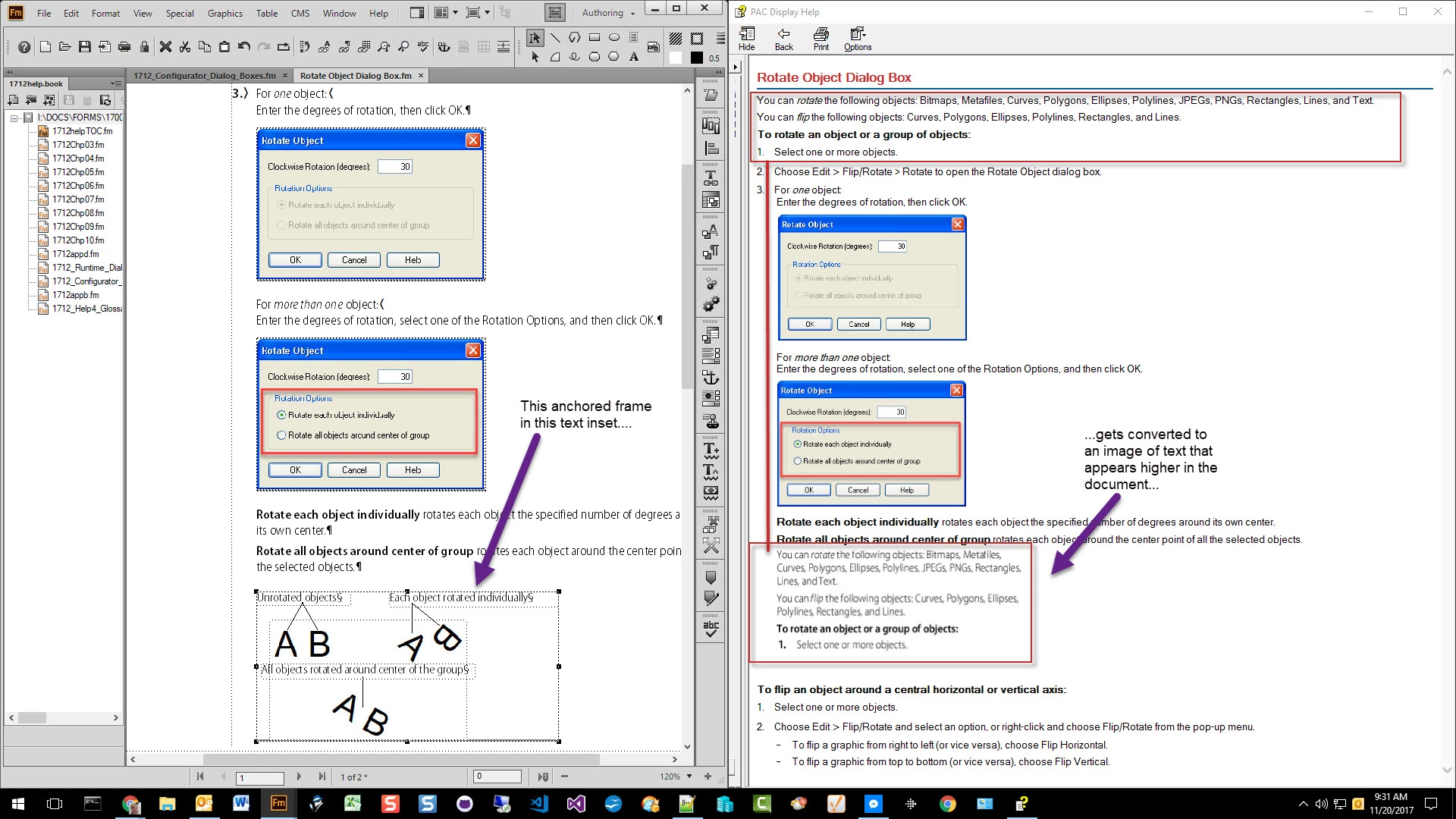
I have seen this error on different pages in the output file, and the only way I can correct it is to convert the text inset to text (which means I have lost the benefit of the text inset).

This topic has been closed for replies.
Correct answer Matt-Tech Comm Tools

Ok, so the anchored frame is likely set to At Insertion Point.

Still no explanation as to the cause, but what about setting the frame to Below Current Line? Same result?

If so, it looks like Rotate Object Dialog Box.fm is the text inset, and that your anchored frame in that file has a large number of objects in it.

I'd reconfig the content in the frame by either:

  • pulling the content out of your anchored frame into a series of anchored frames
  • or creating the graphic in Illustrator or another app.

In FrameMaker - Working with Content, I had a similar issue with a couple of equations...in the end it was easier to take a screenshot of the equations, rather than to track down the details.

3 replies

Participating Frequently
November 20, 2017

Yes, mattrsullivan​—that's one of the tags we apply to anchored frames in order to indent them.

Sometimes those tags are accidentally applied to text, but I double-checked this instance and that's not the case this time.

Participating Frequently
November 20, 2017

Clarification: What you are seeing—the small gray area at the bottom of the frame that looks like tiny text—is the result of applying one of those special graphics tags.  They have a point size of 4 pts.

Matt-Tech Comm Tools
Matt-Tech Comm ToolsCorrect answer
Adobe Expert
November 20, 2017

Ok, so the anchored frame is likely set to At Insertion Point.

Still no explanation as to the cause, but what about setting the frame to Below Current Line? Same result?

If so, it looks like Rotate Object Dialog Box.fm is the text inset, and that your anchored frame in that file has a large number of objects in it.

I'd reconfig the content in the frame by either:

  • pulling the content out of your anchored frame into a series of anchored frames
  • or creating the graphic in Illustrator or another app.

In FrameMaker - Working with Content, I had a similar issue with a couple of equations...in the end it was easier to take a screenshot of the equations, rather than to track down the details.

-Matt SullivanFrameMaker Course Creator, Author, Trainer, Consultant
Participating Frequently
November 20, 2017

I'm using FrameMaker 2015, version 13.0.5.547.

Matt-Tech Comm Tools
Adobe Expert
November 20, 2017

I can't explain it, but I have a question: Your screenshot from Fm appears to have text at the very bottom of the anchored frame. Do you have white, or very small text added at the bottom of the frame?

-Matt SullivanFrameMaker Course Creator, Author, Trainer, Consultant
Participating Frequently
November 20, 2017

Robnurflugel : Have you ever seen this issue?