Almtuna
Inspiring
March 16, 2021
Answered

HTML5 indentation problem

  • March 16, 2021
  • 1 reply
  • 489 views

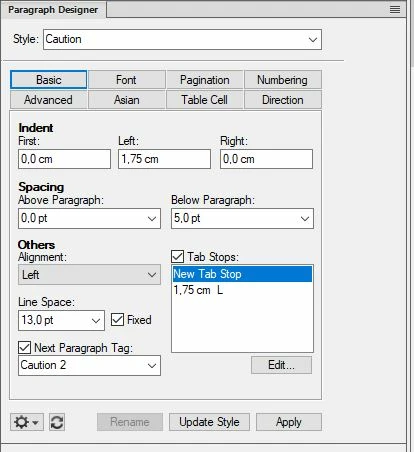
In my FM file I have a paragraph style called Caution. It's defined as:


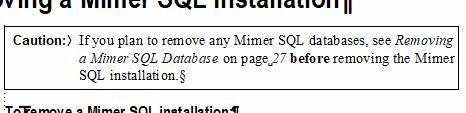
When used in FM it looks like:


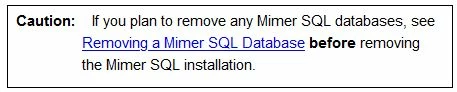
But in the generated Responsive HTML5 it looks like:


How can I get proper indentation in the HTML5 output? Row 2 and 3 should start just under "If".


    This topic has been closed for replies.
    Correct answer Bob_Niland

    Keeping in mind here that the basic problem is lack of a common display context for page/Postscript-origin apps like FM, and terminal/now-mobile contexts like HTML, there is no common model for second line indents. HTML5 "text-indent" only applies to the first line.

    FM (or RH) semi-unsurprisingly implemented it as a borderless table, but then semi-shockingly put all the content in the first column, instead of putting the CAUTION in the 1st col, and the admonishment in the 2nd.

    Musing: another other way to do this requires gaming both the left margin, and using negative text-indent. I can see why the devs might have decided, umm, no, don't think so, on that hack.

    Anyway, that's yer problem. Not sure of a fix, other than deliberately implementing these admonishments as your own borderless tables in FM (which isn't then a simple para fmt apply op).

    Frame-Above is what I used to use, and that might flow more cleanly to HTML.

    1 reply

    Bob_Niland
    Community Expert
    Community Expert
    March 16, 2021

    What is the actual HTML5 markup being generated?

    Almtuna
    AlmtunaAuthor
    Inspiring
    March 16, 2021

    The generated HTML:


    <div width="100%" align="left">
      <table border-spacing="0" dir="ltr" class="table46" border-collapse="collapse" style="max-width: 100% ;height: auto">
       <tr class="tr4">
       <td class="td47">
       <p dir="ltr" class="FM_Caution"><span class="FM_Object">Caution:<span style="padding-left: 13pt;" class="FMAutoNumber_1"></span></span>If you plan to remove any Mimer SQL databases, see <a href="../Establ/Establ.htm#XREF_85208_Removing_a_Mimer">Removing a Mimer SQL Database</a>&#160;<span class="FM_Bold">before</span>&#160;removing the Mimer SQL installation.</p>
    </td>
    </tr>
      </table>
    </div>


    And the css file includes:


    p.FM_Caution {
                  margin-left:49.606pt;
                  margin-right:0.000pt;
                  text-align:left;
                  text-indent:-49.606pt;
                  margin-top:0.000pt;
                  margin-bottom:5.000pt;
                  word-spacing:normal;
                  font-family:'Open Sans'   , sans-serif;
                  font-style:normal;
                  font-weight:normal;
                  font-size:11.0pt;
                  color:#000000;
                  background-color:none;
                  text-decoration:none;
                  letter-spacing:normal;
                  line-height:22px;
    }
    caption.FM_Caution {
                        margin-left:49.606pt;
                        margin-right:0.000pt;
                        text-align:left;
                        text-indent:-49.606pt;
                        margin-top:0.000pt;
                        margin-bottom:5.000pt;
                        word-spacing:0.250em;
                        font-family:"Times New Roman";
                        font-style:normal;
                        font-weight:normal;
                        font-size:11.0pt;
                        color:#000000;
                        background-color:none;
                        text-decoration:none;
                        letter-spacing:0.00em;
    }


    Is that what you asked for? (I'm no html developer, just a programmer.)

    Ideally I'd like to adjust the FM Style Mappings, to get the properly indentation.

    Bob_Niland
    Community Expert
    Bob_NilandCommunity ExpertCorrect answer
    Community Expert
    March 16, 2021

    Keeping in mind here that the basic problem is lack of a common display context for page/Postscript-origin apps like FM, and terminal/now-mobile contexts like HTML, there is no common model for second line indents. HTML5 "text-indent" only applies to the first line.

    FM (or RH) semi-unsurprisingly implemented it as a borderless table, but then semi-shockingly put all the content in the first column, instead of putting the CAUTION in the 1st col, and the admonishment in the 2nd.

    Musing: another other way to do this requires gaming both the left margin, and using negative text-indent. I can see why the devs might have decided, umm, no, don't think so, on that hack.

    Anyway, that's yer problem. Not sure of a fix, other than deliberately implementing these admonishments as your own borderless tables in FM (which isn't then a simple para fmt apply op).

    Frame-Above is what I used to use, and that might flow more cleanly to HTML.