
Inspiring
May 18, 2022
Question

Hyperlink from BACK TO TOP or TOP graphic to the TOC

  • May 18, 2022
  • 2 replies
  • 1042 views

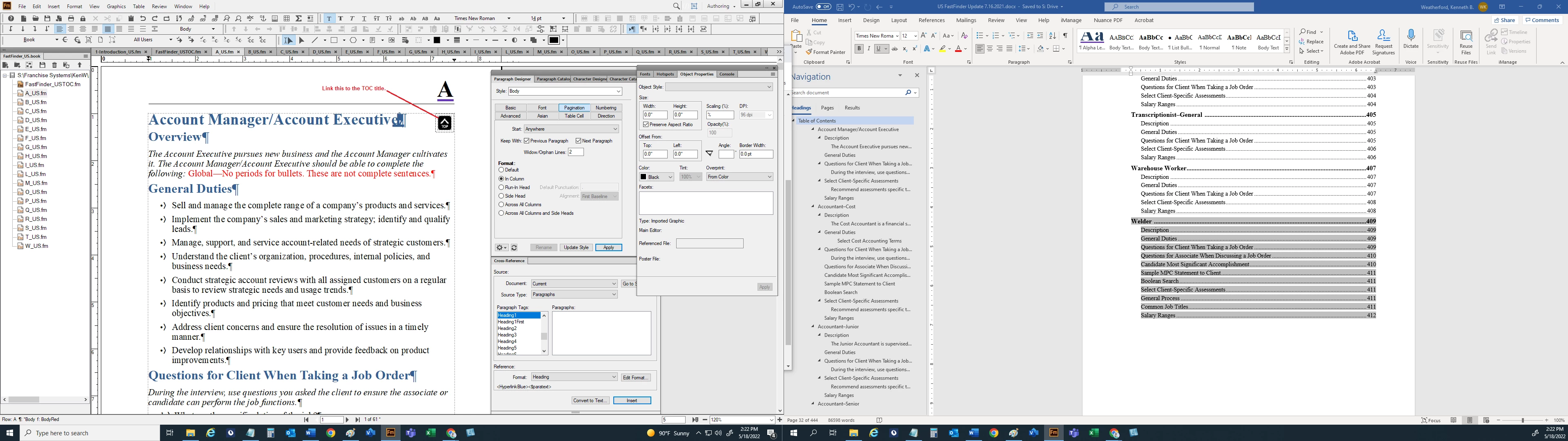
On every page of a new topic I have a right-aligned graphic that says TOP. I want to link this graphic to a TOC marker.  I have tried to created every marker I can think of for the TOC and have also attempted to create the icon as a hotspot, but the Marker Name does not show up in the Hotspot  text field when I select the TOC file.


I just want the end user to be able to navigate back to the TOC by clicking on the icon that is on all topic (Heading1First) pages.


    This topic has been closed for replies.

    2 replies

    Community Expert
    May 19, 2022

    Hi,


    OK. All is explained in the online help.

    https://help.adobe.com/en_US/framemaker/using/using-framemaker/user-guide/frm_graphics_gr-topic_graphics-hotspots.html


    What you have to do:

    In the TOC in the heading add a hypertext marker with Insert | Hypertext. In the Hypertext pod select Specify Named Destination. In the newlink line add a unique text, e.g. TOC_marker.

    In your file where you want to have the graphic open the master page view. Insert a graphics file in the top right margin of the page, outside of any text frame. Right-click on this graphic and select Hotspot Properties. Select your TOC file as destination document. In the list of available markers there should also be your new hypertext marker. Select it and save.

    Then go to the body page view. When you press CTRL+ALT hover over the graphic. The cursor should change to a pointer. When you click the TOC opens at the marker location.


    I just tested this, and it works.

    Is this what you want to do?


    Best regards


    Winfried

    Inspiring
    May 19, 2022

    Winfried, it appears you have it backwards. If I add a hypertext marker in the TOC, I am not going from the TOC to a page, I am going from the TOP icon (image) TO the TOC.  In other words, this TOP icon is placed in the body text to the right of each topic (job type) name. I want the user to click on the icon and jump to the TOC, not the other way around.


    Thanks!

    Community Expert
    May 19, 2022

    Yes. The user clicks on the icon in the body text and jumps to the TOC title.

    Still I do not understand what you want to do.

    The TOC already has the feature to jump from the TOC to the corresponding body page.

    Or do you want to jump from the body page not to the title of the TOC, but to the heading in the TOC?

    Community Expert
    May 18, 2022

    Are the graphics positioned on master pages? If they are, the won't show in the TOC

    Bjørn Smalbro - FrameMaker.dk
    Inspiring
    May 18, 2022

    No they are not on masterpages.

    Community Expert
    May 18, 2022

    ok. My suggestion would be to create a second text flow, where you have the graphics and the text which is to go into the TOC. The graphic alone can not generate a toc line, as the toc is based on building blocks on the reference pages. If you create a secondary text flow however, you can insert texts and graphics and have the appear in the toc based on paragraph styles.

    Bjørn Smalbro - FrameMaker.dk