
Daniela Barros
Known Participant
August 4, 2021
Question

Hyperlinks not working in TOC

  • August 4, 2021
  • 3 replies
  • 516 views

Hi,


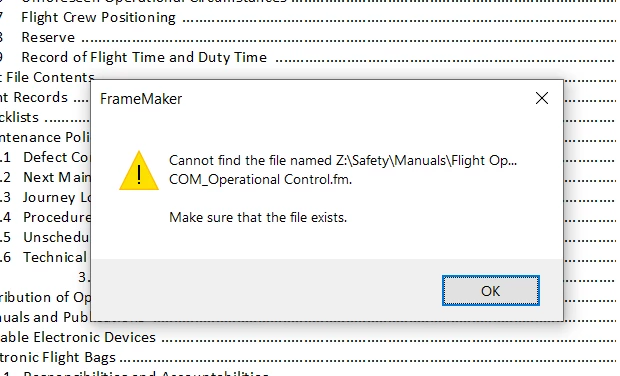
I have generated a TOC for the book, but the hyperlinks are not working for some chapters. These are chapters I have changed the file name. I created another book but they don't work either.



    This topic has been closed for replies.

    3 replies

    Jeff_Coatsworth
    Community Expert
    Community Expert
    August 5, 2021

    And, how did you "change" the file name? From within FM or out in File Explorer?

    Daniela Barros
    Known Participant
    August 11, 2021

    It was on the file explorer 

    Community Expert
    August 12, 2021

    When you change file names via your file manager, then FrameMaker will not know that you changed something.

    You have to do this in the FrameMaker book. Then FrameMaker can adjust all links in the files of this book.

    Community Expert
    August 5, 2021

    Do these hyperlinks work, if you open the target file first?

    Are also other files in the same folder of the target files? Do these work? Is there anything special with the file name? Is the path with the file name too long?

    Do they work, when you move them into the folder of the other files (of course you have to re-insert them in your book)?

    In the book file in the context menu of the files there is a command Open Containing Folder. This opens the folder in your file manager. Does this work?


    Daniela Barros
    Known Participant
    August 11, 2021

    Thank you everyone for the answers. After some tries, I created a new folder from scratch and it worked. o/

    As there were changes on just some sections of the book, I added a version number to the end of the file. Lesson learned: I will always try to keep the same file names in the book. 

    frameexpert
    Community Expert
    Community Expert
    August 4, 2021

    Update the book to regenerate the TOC.

    Daniela Barros
    Known Participant
    August 4, 2021

    I have updated from 'Edit - Update book' but still not working.