


Participant
August 3, 2012
Answered

Hypertext in PDF Issue

  • August 3, 2012
  • 2 replies
  • 1873 views

Hi all,

I am experiencing an error when trying to add hypertext to my FM Book. In the first iteration of this book, I had successfully added hypertext as to "click" and bring up a different page of the book, a page being a FM Document.

Now, I have added an addendum. When I added the Addendum to the table of contents, I intiated a hypertext navigaion as before, stating to navigate to the Addendum. However, when I export the Book to PDF, "Addendum" in the ToC is clickable, however, it does not navigate to the page.

I have checked and double checked everything. I even tried changing an existing, working, hyperlink, then changing it back exactly to how it was. After these changes (and change back) were made, the same thing occured: Clickable, but does not navigate in PDF.

FM, however, does retain the hyperlink addresses in the FM Book document. But the hyperlinks are not retained in any PDF export.

I can only concur that there is some sort of error when saving documents in FM. I have tried reinstalling FM, but to no avail.

Has anyone else experienced this issue?

Any suggestions as to where to continue troubleshooting this issue?

**Also, when I do [CTRL]+[ALT] and click on the new "Addendum" hyperlink in FM, it brings me to the Glossary even though it states "Addendum."    ... "Glossary," which is the link I changed then changed back, goes to the Glossary....however, does not go anywhere in the PDF.

This topic has been closed for replies.
Correct answer Jeff_Coatsworth

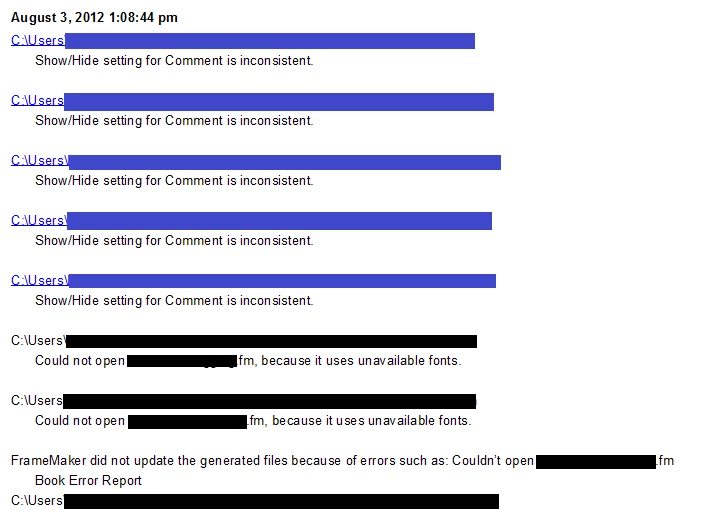
Errors as follow:


You'll need to fix those book errors up before you try updating the book. Make sure your .fm files are all fully accessible & not locked. Set the Show/Hide settings on all parts of the book to override the individual document settings & then fix those unavailable fonts. If you don't care about them missing, just switch off the "don't remind me" flag - open the offending files; save them; then turn the option back on again. FM should have done a font substitution for you.

2 replies

Van Kurtz
Inspiring
August 3, 2012

How are you creating the table of contents?

If you use FrameMaker's Add > Table of Contents, in the dialog select Create Hypertext Links. When you create the PDF, select Generate Acrobat Data. Click PDF Setup and select Create Named Destinations in the Links tab. The resulting PDF should have clickable entries in the TOC.

Van

Participant
August 3, 2012

Van,

I created the ToC manually, by typing it up and adding links to it myself. I have tried to use the FM ToC generator, but I have recieved errors, because some of my 'chapters' are "read only" or "contain incompatible fonts." I have tried fixing these documents, but a similar problem occures: It doesn't save.

This was the first document I created in FM, and I had zero experience with the program. I (must have) did a lot of things the hard way. I will definitely try it your way the next time I make a Book document, though!

Bob_Niland
Community Expert
Community Expert
August 3, 2012

> Now, I have added an addendum.

Is this a component file of the .book, or something in such a file?

> I intiated a hypertext navigaion as before ...

And how was that done?

Simple cross-references in Frame automatically become hyperlinks in the PDF, when the link and target are in the same PDF.

If you are using Hypertext Markers, you're doing it the hard way, unless the Addendum is an external PDF. Getting that to work is bt trickier.

Participant
August 3, 2012

The Addendum is an additional FM file. I have as such "Intro, Chapter 1, Chapter 2, etc..." The Addendum is just another chapter I am trying to insert into the book.

I have used Hypertext Markers to create the link.

I tried creating a FM-generated ToC, and that has given me an abundance of error reports trying to do that. Perhaps I should just try to rework the document from scratch?

Van Kurtz
Inspiring
August 3, 2012

I tried creating a FM-generated ToC, and that has given me an abundance of error reports trying to do that. Perhaps I should just try to rework the document from scratch?

FrameMaker's tools for creating tables of contents are very straightforward and should not generate errors. What kinds of errors are you getting? I would wait on creating the document (which document, the whole  book?) from scratch until you are sure you are using Frame's tools correctly.

Van