
Known Participant
August 18, 2023
Answered

I am trying to keep the heading increased by 1 but it is not happening the same in Adobe Frame Maker

  • August 18, 2023
  • 5 replies
  • 841 views

I am trying to keep the heading increased by 1 but it is increasing by 2. Can someone explains how to fix this. I am attaching the screenshot for reference.  

    This topic has been closed for replies.
    Correct answer Barb Binder

    Hi Amit:


    Here's what we couldn't see in your screen shots:


    Your heads are in a 2-cell table. Each cell is using H1_Heading 1 and auto-numbering is activated. The number itself is set to white, and while white is visible against the dark background in the first cell, it is invisible in the second cell. But it is still there and incrementing. 


    When I change the color of the numbers to red, the issue is immediately illustrated. The numbers are incrementing across and then down.
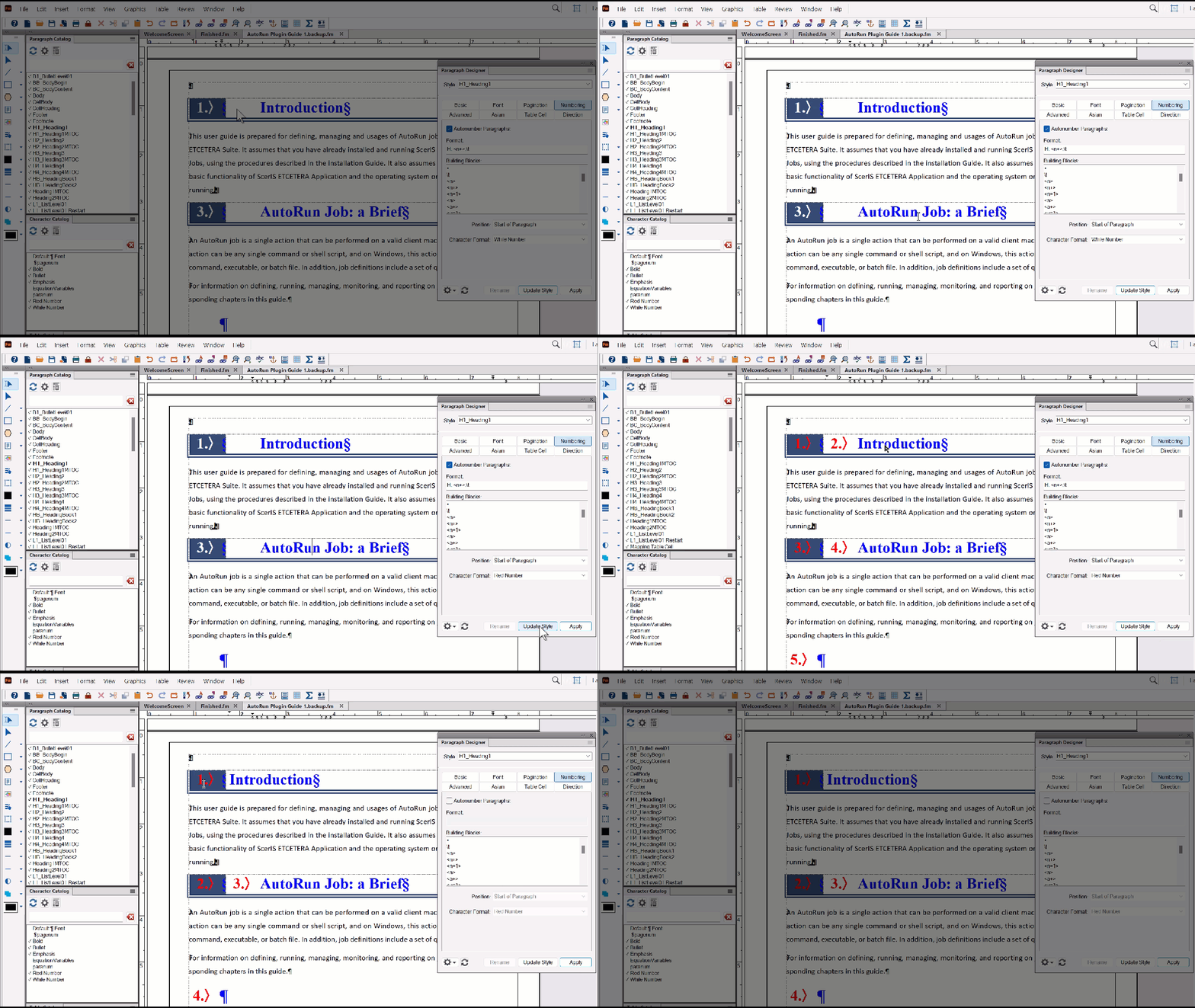


    If this is the look you want with the two-cell table, you will need two paragraph styles: one for the incrementing white number, and one without any numbering at all on the head text that is sitting next to it.


    ~Barb


    5 replies

    Barb Binder
    Community Expert
    Community Expert
    August 23, 2023

    Great! 


    ~Barb

    ~Barb at Rocky Mountain Training
    Barb Binder
    Community Expert
    Barb BinderCommunity ExpertCorrect answer
    Community Expert
    August 23, 2023

    Hi Amit:


    Here's what we couldn't see in your screen shots:


    Your heads are in a 2-cell table. Each cell is using H1_Heading 1 and auto-numbering is activated. The number itself is set to white, and while white is visible against the dark background in the first cell, it is invisible in the second cell. But it is still there and incrementing. 


    When I change the color of the numbers to red, the issue is immediately illustrated. The numbers are incrementing across and then down.


    If this is the look you want with the two-cell table, you will need two paragraph styles: one for the incrementing white number, and one without any numbering at all on the head text that is sitting next to it.


    ~Barb


    ~Barb at Rocky Mountain Training
    Known Participant
    August 23, 2023

    Thank you very much Barb! I got it. 

    Matt-Tech Comm Tools
    Community Expert
    Community Expert
    August 21, 2023

    Hi Amit, 

    Rick and Barb are spot-on with the problem and the solution.

    There's likely a paragraph between your 1 and 3 that is incrementing the H: autonumber series applied to H1_Heading1.

    If your heading value isn't referenced in another paragraph's autonumber with the <n> building block, try changing the H: to a X:, Y:, or Z: and updating the paragraph style to isolate it from other autonumbered paragraphs.

    If that doesn't solve it, you can easily set the value back to H:<n+>\t

    Additionally, if that doesn't solve the problem, search line-by-line for a paragraph that is inadvertently incrementing your H: value.


    Lastly, if the problem still remains (or if you want to check an easy, unlikely issue first...) double check that the paragraph style used for Autorun Job: a Brief is using the same H:<n+>\t


    Let us know what you find out!


    -Matt


    -Matt Sullivan, FrameMaker Course Creator, Author, Trainer, Consultant
    Known Participant
    August 22, 2023

    Thank you Matt, I'll do the same.

    Barb Binder
    Community Expert
    Community Expert
    August 21, 2023

    Hi Amit:


    Unless you adress this with series labels, any <n+> that appears between two headings will increment the <n+> value. 


    I'm teaching today, but happy to look at your file on a break, if you'd like to share it. 


    ~Barb

    ~Barb at Rocky Mountain Training
    Known Participant
    August 22, 2023

    Sure Barb, Thank You!

    frameexpert
    Community Expert
    Community Expert
    August 18, 2023

    Click in the paragraph under the first heading and see if there is an autonumber applied.

    Known Participant
    August 21, 2023

    It is applied. Can there be an issue with its table? I have inserted a table, made the top and right border invisble, and then inserted heading1st in it.