
Participant
June 10, 2019
Question

I can't generate a PDF in FrameMaker 2019

  • June 10, 2019
  • 2 replies
  • 663 views

I have been working in FrameMaker 2019 and Adobe Acrobat since last fall. I was just upgraded to a new laptop, and now I can't get FrameMaker 2019 to generate a PDF, either by the Save as PDF function or the Publish function. Here is the error message I keep getting.
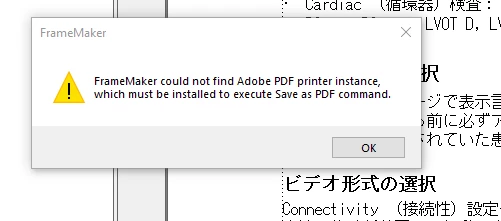
The new laptop is a Windows 10 computer (versus Windows 7), but it has Print to PDF set up as far as I can tell. The strange thing is that this laptop was previously used by a former member of our team so it came pre-installed with FrameMaker 2019 and Adobe Acrobat. She had been using it for several months.

I can create PDFs just fine using the Acrobat extension in Word.

Any ideas? Do I need to reinstall FrameMaker, Acrobat? Is it a Windows issue?

Thank you,

Nora Smart

    This topic has been closed for replies.

    2 replies

    Jeff_Coatsworth
    Community Expert
    Community Expert
    June 11, 2019

    I think there was a bug that was stopping the installation of the Adobe PDF printer instance in your list of Windows printers. I recall other threads mentioning this and suggesting workarounds to install it manually, but your best be is to reach out to FM folks at tcssup@adobe.com.

    norasmartAuthor
    Participant
    June 11, 2019

    I was able to fix this issue by installing the latest updates of Acrobat DC. It's still having quirky issues, but at least I can generate a PDF.

    Adobe Employee
    June 11, 2019

    Hi Nora,

    Best to reach out to customer support team and they could help you out with the same.

    thanks
    Amitoj Singh