Inspiring
March 19, 2021
Answered

I do not want table style to break to the next page

  • March 19, 2021
  • 2 replies
  • 324 views

I want to keep each table on the same page instead of breaking across pages. How would that affect tables larger than a page?

    This topic has been closed for replies.
    Correct answer Barb Binder

    Hi Ken:


    FrameMaker has features that will address both layout issues for you.


    Enable float for the short tables, so if the table can't fit at the bottom of a page it moves to the top of the next page, but here's what's cool—the text that was after the table will backfill the empty space left at the bottom of the previous page. It's in Table Designer > Basic. 


    Add one or both of the table variables to the long tables—The Table Continuation variable will add the word continued to the second and subsequent pages of the table, and the sheet count will identify the sheet number of the total. For example, for a four page table: Sheet 1 of 4, Sheet 2 of 4, etc. These variables help the reader understand where they are within the multi-page table. Because really, we can't always fit a table on a single page. These are in the variables pod, but you can also add them through the Table menu.


    ~Barb 


    Float example

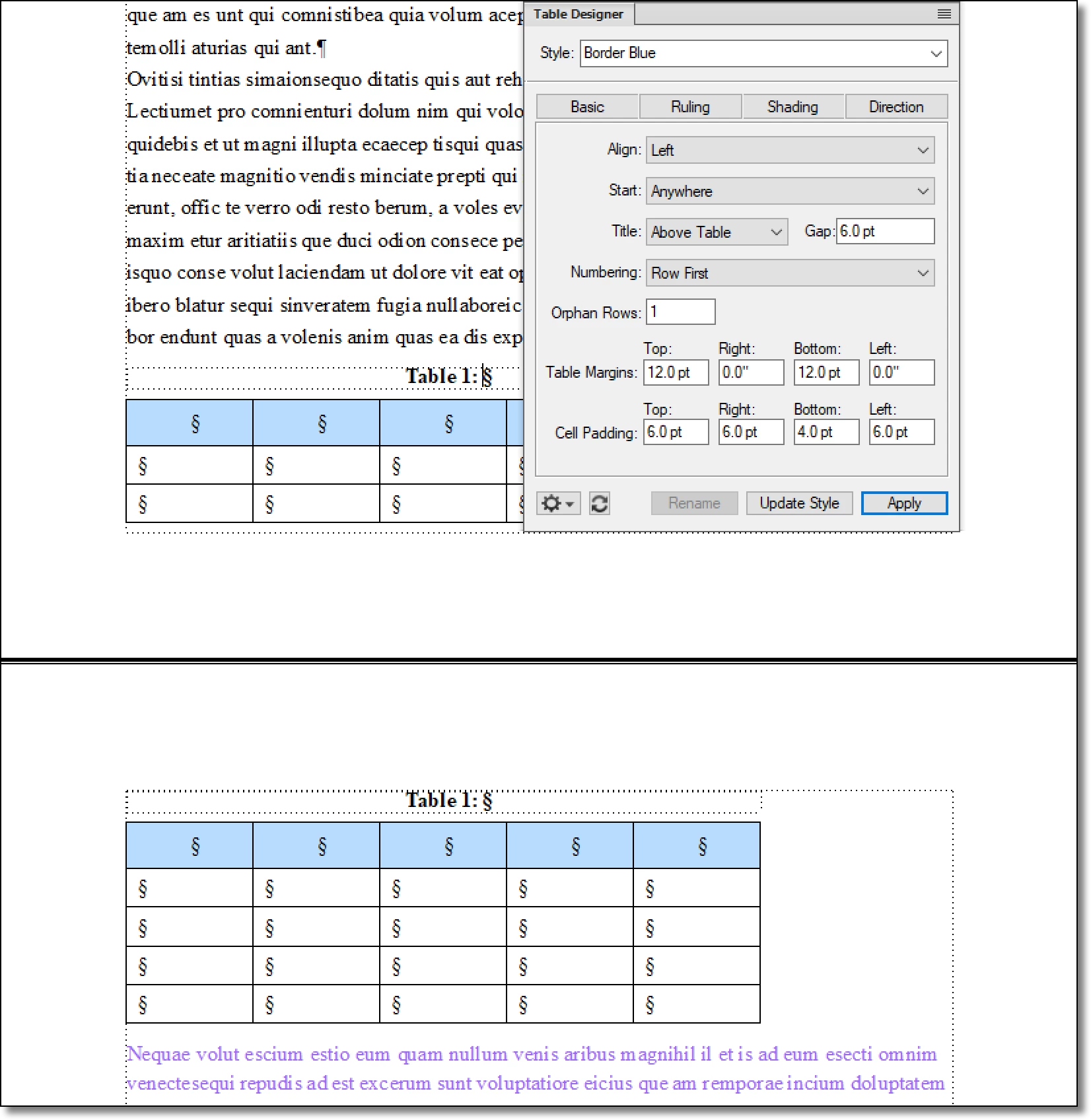
    Table spits across pages (note mauve text below).
     

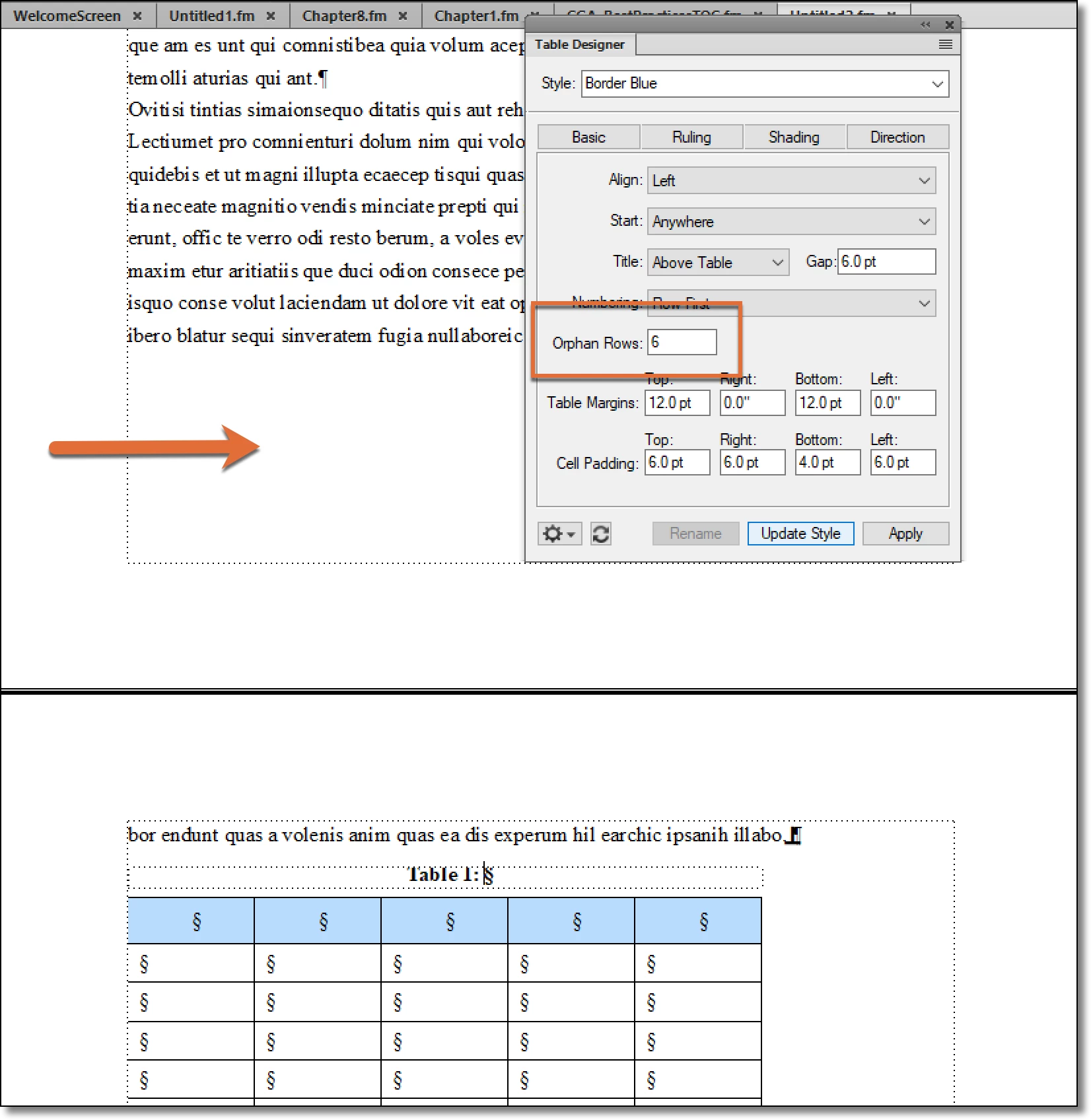
    Enable orphan rows (1-255) to keep the rows together. Note the large gap left behind.
     

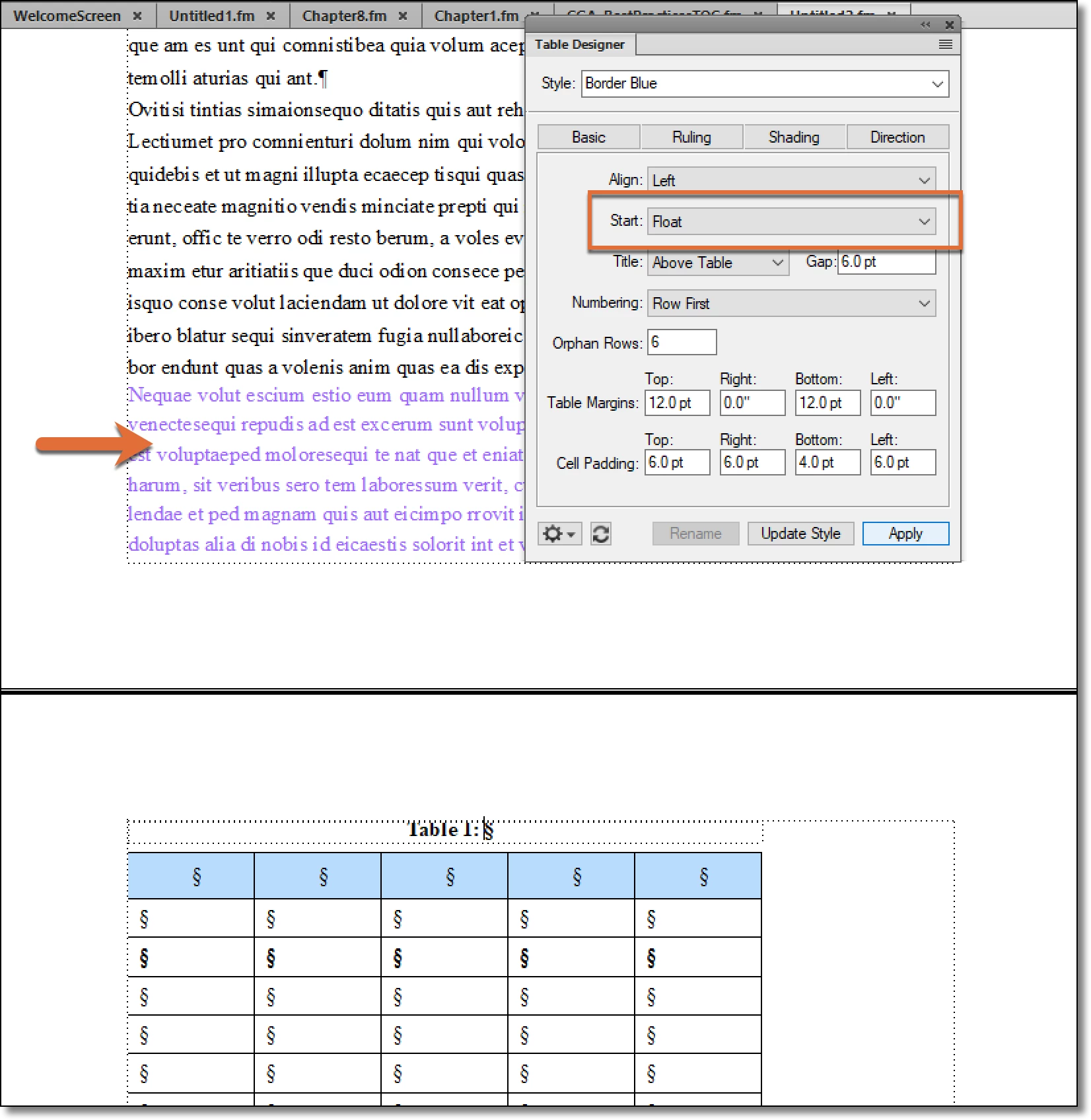
    Enable Float. The text that was after the table backfills and the table is at the top of the next page. 
    2 replies

    Barb Binder
    Community Expert
    Barb BinderCommunity ExpertCorrect answer
    Community Expert
    March 19, 2021

    Hi Ken:


    FrameMaker has features that will address both layout issues for you.


    Enable float for the short tables, so if the table can't fit at the bottom of a page it moves to the top of the next page, but here's what's cool—the text that was after the table will backfill the empty space left at the bottom of the previous page. It's in Table Designer > Basic. 


    Add one or both of the table variables to the long tables—The Table Continuation variable will add the word continued to the second and subsequent pages of the table, and the sheet count will identify the sheet number of the total. For example, for a four page table: Sheet 1 of 4, Sheet 2 of 4, etc. These variables help the reader understand where they are within the multi-page table. Because really, we can't always fit a table on a single page. These are in the variables pod, but you can also add them through the Table menu.


    ~Barb 


    Float example

    Table spits across pages (note mauve text below).


    Enable orphan rows (1-255) to keep the rows together. Note the large gap left behind.


    Enable Float. The text that was after the table backfills and the table is at the top of the next page. 

    ~Barb at Rocky Mountain Training
    LinSims
    Community Expert
    Community Expert
    March 19, 2021

    If the table is longer than the page, it will break to the new page even if you tell it to keep all the rows together. The only way around this is to make the text smaller until the table fits on one page, and at that point you may run into legibility issues.


    If you mean you have a single row that is longer than the page, the row will continue off the page (you'll see a black line at the bottom of the page) and you won't see anything in the row below the bottom of the page. It won't carry over.


    For example, say you have a page that is 8.5" long with 1" margins top and bottom, leaving you 7.5" of space for text. If your row is more than 7.5" long, FM will display as much as can be fit into the 7.5" and the rest will be invisible.

    Inspiring
    March 19, 2021

    It is a short table (just a few rows) and do not want it to break with a couple of rows on one page and a couple of rows going to the next page. Instead, it would all be bumped to the next page. I will have to figure out the long ones!

    LinSims
    Community Expert
    Community Expert
    March 19, 2021

    Ah, that's different. I thought you were talking about a table with so many rows that it was longer than the page. 


    What Barb says is good. I always forget about Float because I have no use cases where it's appropriate. I need my tables to stay where they are relative to the text above and below. If don't mind having the table move relative to the text and are okay with the backfill she describes, use Float.


    If not, then you can either set the Orphan rows to a number larger than the number of rows in the table, or you can use Keep with Next/Previous, which is available on the Table Row dialog. To keep with next/previous, highlight all the rows you want to keep together, the press Esc-tr, then select the option(s) you need to control the keep together.


    Setting the Orphan rows is easier.