Participant
Jan 13, 2021 7:24 AM UTC
Question

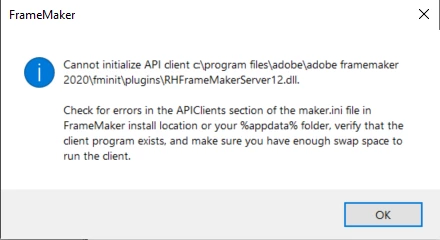
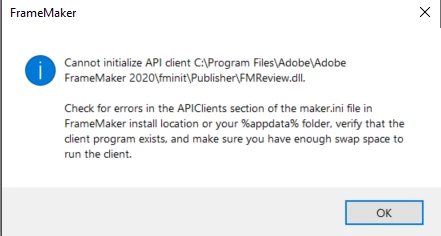
I get this two error dialog boxes while starting up the Framemaker 2020.

Cannot initializer API Client - FMReview.dll

Cannot initializer API Client - RHFrameMakerServer12.dll 


I am using Framemaker 16.0.1.817.. does anybody know the answer to this issue? 
This topic is closed to new replies. Start a new post to keep the conversation going.

8 replies

Community Expert
Jan 20, 2021 9:26 AM UTC

Hi,


There are some more threads about such error messages. Specifically:

https://community.adobe.com/t5/framemaker/quot-cannot-initialize-api-client-quot-fminit-publisher-fmreview-dll/m-p/8827202?page=1

https://community.adobe.com/t5/framemaker/cannot-initialize-api-client-c-program-files-x86-adobe-adobeframemaker2015-fminit-publisher-fmreview/m-p/8841300?page=1


The poster commented a line out in maker.ini.

If you do the same, close FrameMaker and make a backup of maker.ini first!

The line in maker.ini is:

FMReview = Standard, Review FrameMaker Documents, fminit\Publisher\FMReview.dll, all, null, fminit\Publisher

To comment this out, add a semicolon at the beginning of this line.


More ideas:

Did you check, whether these dll files are in the FrameMaker installation folder? (I found them.

What happens, when you deactivate your anti-virus application?


Best regards


Winfried

Translate
Participant
Jan 28, 2021 10:44 AM UTC

Thank you for all these idea Winfried! I will try do the things you have mentioned here.. I have to work with my IT support guys to do all of this as they require Admin permissions! 

Translate
Jeff_Coatsworth
Community Expert
Community Expert
Jan 13, 2021 1:03 PM UTC
Participant
Jan 20, 2021 9:02 AM UTC

Thank you for your reply.. I did try installing Adobe Acrobate Professional and still it didn't solve my problem. Working with my IT support to troubleshoot the errors.. 

Translate
Jeff_Coatsworth
Community Expert
Community Expert
Jan 13, 2021 12:35 PM UTC

Won't hurt to try. I forget what 16.0.1.817 represents in FM version, but were you able to update it?

Translate
Participant
Jan 13, 2021 12:43 PM UTC

I did try updating.. it said the current version is up-to-date.. 

Translate
Jeff_Coatsworth
Community Expert
Community Expert
Jan 13, 2021 12:20 PM UTC

Are you all patched up? Check Help > Updates to check. Did you install FM with Admin rights?

Translate
Participant
Jan 13, 2021 12:24 PM UTC

Yes my IT department installed it with admin rights. Do I need to be running it as an admin also to not see these errors? 

Translate