Jacob_AA
Known Participant
January 18, 2019
Question

I'm running extendscript in command line and get an alert.

  • January 18, 2019
  • 8 replies
  • 2757 views

../ExtendScript Toolkit.exe" -run exampleScript.jsx
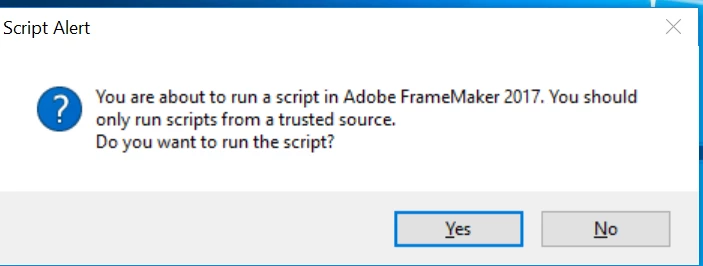
Does anybody know how can I disable this ? or is there any good way to run the extendscript in non interactive mode.

This topic has been closed for replies.

8 replies

Jacob_AA
Jacob_AAAuthor
Known Participant
January 18, 2019

Thanks. I can run the FrameMaker from command line but then when i run the script it shows same alert.

path/FrameMaker.exe

../ExtendScript Toolkit.exe" -run exampleScript.jsx

And I see the alert

Jacob_AA
Jacob_AAAuthor
Known Participant
January 18, 2019

yeees.

frameexpert
Community Expert
Community Expert
January 18, 2019

Can you launch FrameMaker from a command line? If so, a better approach may be to launch FrameMaker from a command line and have a Notification script that will run automatically when FrameMaker starts and do what you want. I don't think there is a way to pass arguments to ExtendScript from a command line.

Another way to do it is to store your arguments in a small XML file and then when the script is invoked, it can pick up the arguments from the XML file.

www.frameexpert.com
Jacob_AA
Jacob_AAAuthor
Known Participant
January 18, 2019

in my code .jsxbin it doesn't open the file because frame maker is closed. when i run .jsxbin in frame maker run script .jsxbin it works. but i need to run it from command line.

4everJang
Legend
January 18, 2019

Did you add the line

#target framemaker

at the start of your script ?

Jacob_AA
Jacob_AAAuthor
Known Participant
January 18, 2019

it is my function to which i give path of the book.  I'm wondering if the path 'C:\\Users\\user\\Desktop\\test\\test.book' is wrong

4everJang
Legend
January 18, 2019

Seems to be fine with the ecaped backslashes. First thing to do is insert a bunch of Err( ) commands to your code, so that you can read what the various parameters are in the console. After a critical command, such as Open( ) on the book, print the FA_errno to the console with some text indicating where the code is. If FA_Errno is 0, everthing is OK If not, you need to chedk the scripting guide for the meaning of the error code. Do this immediately after the critical function call, as FA_errno gets overwritten by subsequent calls.

Jacob_AA
Jacob_AAAuthor
Known Participant
January 18, 2019

So, you mean that this might be wrong ?

var doc = OpenFile ('C:\\Users\\user\\Desktop\\test\\test.book')

4everJang
Legend
January 18, 2019

OpenFile is not a function I recognize. To open a FM book or file, you need the much more elaborate Open(  ) function, for which you need to define a set of propVals and provide an array of propVals for the method to report back properties when the Open failed. Check the Scripting Guide for the global Open(  ) function.

Jacob_AA
Jacob_AAAuthor
Known Participant
January 18, 2019

Seems, I managed to overcome the problem moving the script to the /Adobe Scripts/

When I run .jsxbin I don't see any alert but it doesn't open book/files

btw, do you know how to pass arguments on command line something like the following:

../ExtendScript Toolkit.exe" -run exampleScript.jsx arg1 arg2

4everJang
Legend
January 18, 2019

If your script uses relative paths it will be relative to the location of the script. That might cause some file related commands to fail - try adding an Err(   ) to make the full name of the book or file to be opened in the console.

As for command line arguments - I have never tried that. You may find information by searching for the $ object. That is a generic Javascript construct pointing to the current script. This is also where you find the path name of the currently executed script, so there might be properties or methods for arguments as well.

Jacob_AA
Jacob_AAAuthor
Known Participant
January 18, 2019

I run extend script in command line:

../ExtendScript Toolkit.exe" -run exampleScript.jsx

it works okay but I don't want to press yes each time to avoid the alert.

4everJang
Legend
January 18, 2019

Then you need to create a command for it and add it to one of the menus - or create your own menu. Then the command will be run from within FrameMaker instead of outside - which may be seen as a malicious attack. If the alert would not show, a mail attachment could automatically fire a script and do something disruptive.

4everJang
Legend
January 18, 2019

Hello Jacob,

There are several ways to fire an extendscript in FrameMaker without having to call it explicitly from the commandline.

1. Create a command and add it to one of the menus.

2. Create an event handler that fires when a particular event happens (e.g. PreFileOpen or PostSaveXml)

3. Create a script that is executed automatically whenever FrameMaker starts.

Usually, it is a combination of these that you would need. If you explain what you need we may be able to help.