



ConfusedCrane
Participant
June 17, 2026
Question

I'm trying to align data in table cells. They want the longest numbers to be centered and the rest of the numbers to be right aligned off of those. How can I do this to make sure data are cleanly aligned?

  • June 17, 2026
  • 4 replies
  • 0 views

I'm trying to align data in table cells. They want the longest numbers to be centered and the rest of the numbers to be right aligned off of those. How can I do this to make sure data are cleanly aligned?

Here’s an example of how it looks when center alignment is selected: 
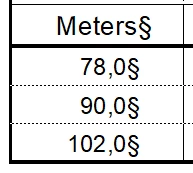
Here’s an example of the alignment they are asking for: 
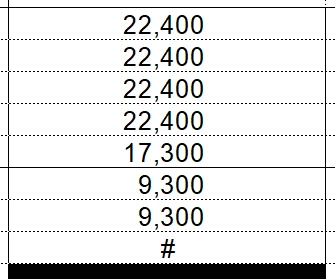
their requested alignment

22,400 is centered, and the remaining numbers are right aligned off 22,400 (not right aligned to the table cell itself). 

Adjustments I’ve made in the Basic tab of the Paragraph Designer haven’t created the desired result. The only thing I’ve figured out is to hit the space bar, but that’s a “solution” I’d have to do manually for hundreds-thousands of cells. 

How can I align the data so the number with the most digits is centered, and smaller numbers are right aligned to it?

I appreciate the community help, thank you!

4 replies

frameexpert
Community Expert
Community Expert
June 17, 2026

I should add that the whole process could be scripted, which would be useful if you have tons of existing tables. ​@Bob_Niland and I have given you manual processes.

www.frameexpert.com
ConfusedCrane
Participant
June 17, 2026

Good to know, what would scripting involve?

frameexpert
Community Expert
Community Expert
June 17, 2026

I would let you enter the numbers however you want; for example, all center-aligned. Then a script would walk through each column, calculate the longest number and perform the operation that I outlined in my reply. You would be able to run a script like this on an entire document or book with a single command.

www.frameexpert.com
Bob_Niland
Community Expert
Community Expert
June 17, 2026

For a small number of these, where the numbers are typed/pasted in, as a quick fix, you can:

  1. Create a color name, perhaps “Invisible”, and assign it a visible color, perhaps green.
  2. Create a character format, perhaps named “Invisible”, which is As-Is for all attributes except Color, which is in this case “Invisible”.
  3. Pad the leading and trailing digits with “0” characters, so that all cells have the same number of digits on either side of the radix indicator (, or .)
  4. For publication: View 🞃 Color > Views…
    Decide which Color View you are going to use for authoring vs. publication.
    Move color Invisible to the Invisible column for that view

The alignment won’t be perfect, depending on the font used for the numbers. But using this technique, you can see the padding, but it will be absent in the output, while preserving the spacing.

I use this hack a lot for other purposes, switching content on and off (without reflow, which would be a problem with Conditional Text).

ConfusedCrane
Participant
June 17, 2026

That makes sense, thank you

frameexpert
Community Expert
Community Expert
June 17, 2026

A lot will depend on how consistent your table column widths are that contain your numbers. Here is a process I may use to set this up:

  1. In a representative table cell with the correct width, enter a number that would typically be the longest. Center align the text in the cell.
  2. In the cell below, enter the same number, but right-align it.
  3. Open the Paragraph Designer and go to the Table Cell tab. Experiment with the Right Cell Margin setting until this number aligns with the number in the cell above it.
  4. Once you have them aligned, create a new Paragraph Format and use that for all of the numbers in that table column. As long as the number of digits are less than or equal to the longest you entered in step one, all of your numbers will align.
www.frameexpert.com
ConfusedCrane
Participant
June 17, 2026

That looks like a workable option thank you

frameexpert
Community Expert
Community Expert
June 17, 2026

Do you have time for a quick (no cost) meeting? I can give you some ideas and you can summarize what works to the list. Contact me off-list: rick at frameexpert dot com

www.frameexpert.com