Inspiring
February 27, 2018
Answered

I want to create an object style that doesn't apply "fixed" dimensions to the object.

  • February 27, 2018
  • 2 replies
  • 405 views

I am trying to create an object style (for instance) that will create an in-line image, at the insertion point, 8 points below the line. Some of the images are wider than others, and they keep on being constrained to the size of the original object I used.

Is there a way around this?

This topic has been closed for replies.
Correct answer Barb Binder

Hi Andrew:

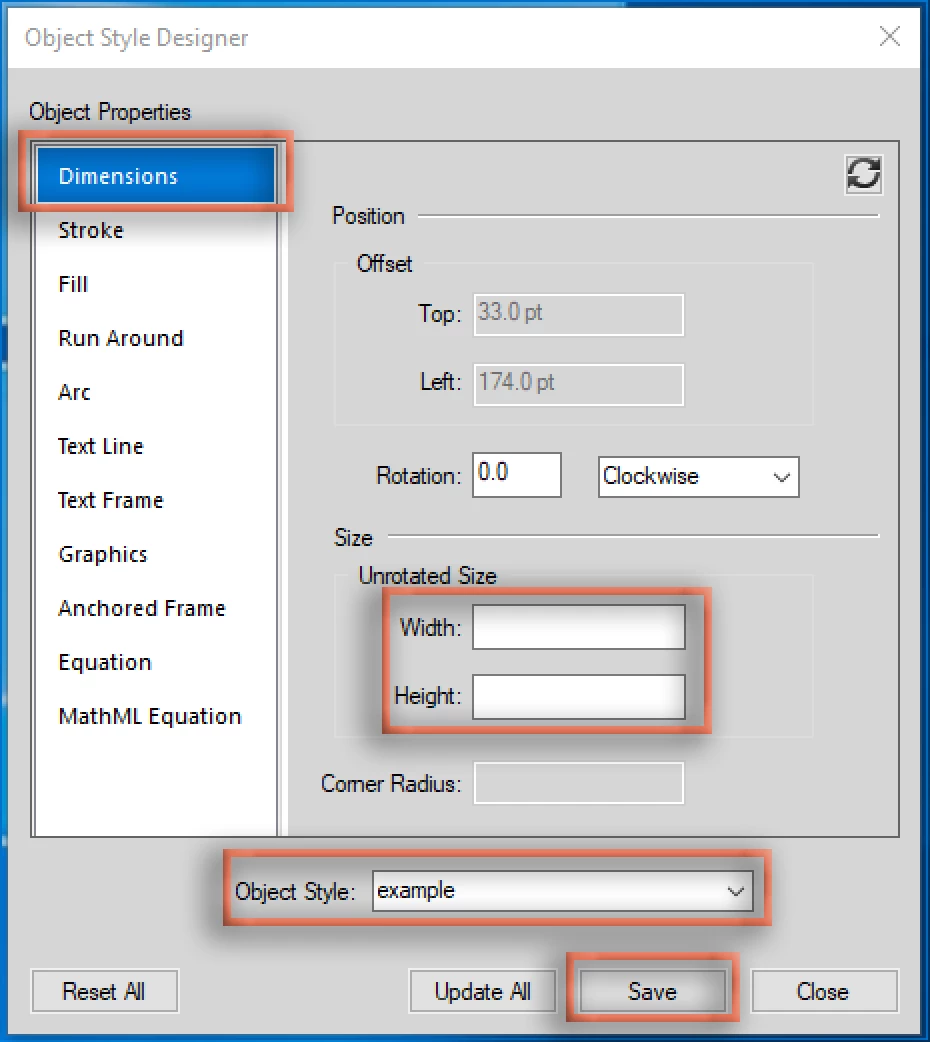
In my opinion, Object styles are awkward in FrameMaker, and don't conform to the other Designers. However, you can achieve what you want if you delete the size parameters before you save the style. Think: Set Window to As Is.

~Barb

2 replies

Matt-Tech Comm Tools
Community Expert
Community Expert
February 27, 2018

You can use the Reset button in the upper right of the Dimensions pane to set everything there to As Is, but I start all my Object Styles by selecting the Reset All button in the lower left (See Barb's screenshot)

Then you can set the Anchored Frame properties you need, give a great name (like Button, or Inline Graphic) and apply as needed.

I use this technique in all my books, but I have the additional problem of needing to adjust the baseline for images of differing heights. For that, I hold down the Alt key and use the up/down arrows to adjust as needed (Shift+Alt if there's a big move needed)

Feel free to message me (hover over my name to get the message option) with your email if you'd like me to send you a doc with this object style in it.

-Matt

-Matt Sullivan, FrameMaker Course Creator, Author, Trainer, Consultant
Barb Binder
Community Expert
Barb BinderCommunity ExpertCorrect answer
Community Expert
February 27, 2018

Hi Andrew:

In my opinion, Object styles are awkward in FrameMaker, and don't conform to the other Designers. However, you can achieve what you want if you delete the size parameters before you save the style. Think: Set Window to As Is.

~Barb

~Barb at Rocky Mountain Training
Inspiring
February 27, 2018

Yes, I experimented a bit, and I found that out. It's not perfect, but it's better than setting all the object properties for each image when it's imported.

Thanks!