Bill_at_HNS
Known Participant
June 3, 2011
Question

Icons used on the Frame 9 interface

  • June 3, 2011
  • 2 replies
  • 515 views

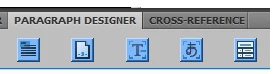
Many of the icons used in the Frame 9 user interface are in no way visually related to what they represent. Surprising that a design-oriented company like Adobe would let them out the door. Most of the icons should be redone. (Maybe in Frame 10 they are?)

Here are some of the choice icons from Frame 9, purposely not identified here. If you learn what they represent, they can be helpful, but if you don't know them, you can be left clueless. Thank God for balloon tips.

I really doubt if I'm the only person who looks for B for bold, and I for italic, as used on many other software programs. But Frame gives us:
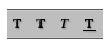
I can imagine the "logic" behind this, but for me this just doesn't work. Do I want T or T or T?  I wonder if I'm the only one.

    This topic has been closed for replies.

    2 replies

    Participating Frequently
    July 8, 2011

    Hi Bill,

    I don't have Frame 9 but RoboHelp has the same (IMHO silly) TTT buttons. I managed to change the button bitmaps with Customize Toolbar; I was able to copy the bitmaps from Word and add them to RoboHelp.

    A caveat; on RoboHelp 7 this actually broke something (the dropdown Styles menu if I remember correctly), so be alert for side-effects.

    --- Derek

    Jeff_Coatsworth
    Community Expert
    Community Expert
    June 6, 2011

    Sorry, they're the same on FM10 too. Many Framers work on a keyboard shortcut basis & never pay any attention to the mouse and icons.

    Bill_at_HNS
    Known Participant
    July 7, 2011

    Even if many "Framers" do use keyboard shortcuts (I use some myself), if the icons are there, they should be well-designed to convey the meaning or function.
