Hi Ashan Ahmad.
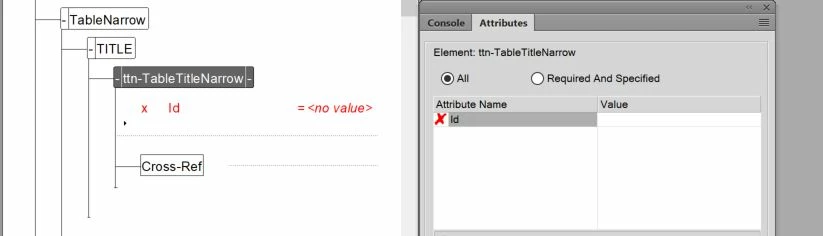
In the screenshot it looks as if you have creted a structured FameMaker document that has an Id attribute on the ttn-TableTitleNarrow element. Then you have updated your EDD to remove the Id attribute and re-imported it into your document. In the Attributes pod the red cross shows that the element contains an undefined attribute. To remove that,do the following:
- Right click on the attribute in the pod.
- Click on Delete.
- Validate your document to check for other errors.
Although these instructions will help you to remove the bad attribute. It may not be the result you are looking for? Go back into the EDD and check the definition of the Id attribute. Does it still exist? If not simply add the attribute definition to the ttn-TableTitleNarrow element definition. It should look like this:

With the structure view like this:
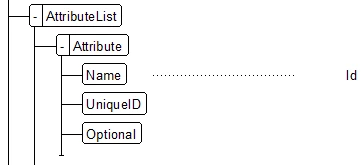
UniqueID is a special type of attribute where its value must be unique within a structured document or documents within a structured book. If you have two or more identical UniqueID values in the same document a validation error will be generated. Attributes of type UniqueID are most commonly used as part of the cross referencing mechanism in structured documents. In the example above the Id attribute is Optional so it is valid for the attribute to have no value assigned to it. If the attribute is Required, then it would cause a validation error if the Id did not have a value.
The IDReference attribute provides a way to point to the UniqueID type attribute on another element in the same document. We use this primarily for creating Cross references between elements in a document. You may define an XREF element for example and add an IDref attribute. When you add the XREF into your document FrameMaker will display a list of elements that can have an UniqueID along with a list of instances of that element which allows you to select the target for your XREF.
I hope that helps a little?
Ian





 AdChoices