

K.Daube
Community Expert
Community Expert
January 16, 2023
Question

Idea for a utitlity: Build Tool Bars for FM

  • January 16, 2023
  • 3 replies
  • 670 views

After years of creating and updating the Enhanced Tool Bars I feel the time ready to develop a utility. Although this could be a script running in FM I envision an external utility:

  • All necessary data can be accessed without FM processes (*.ini,*. xml).

  • I will use AutoHotKey for the script. This can be compiled so that a used do not need to have AHK installed.

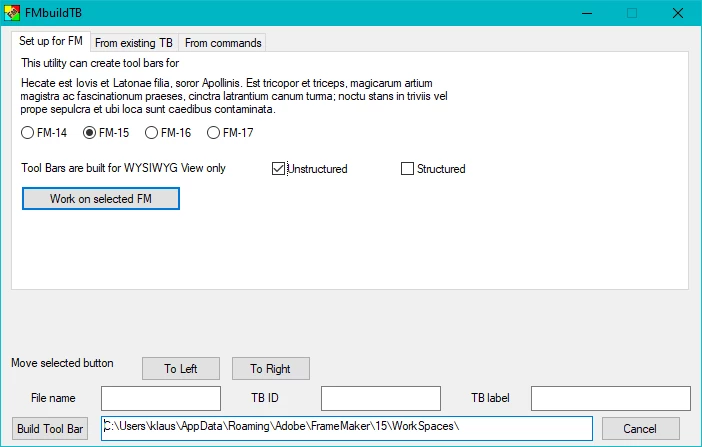
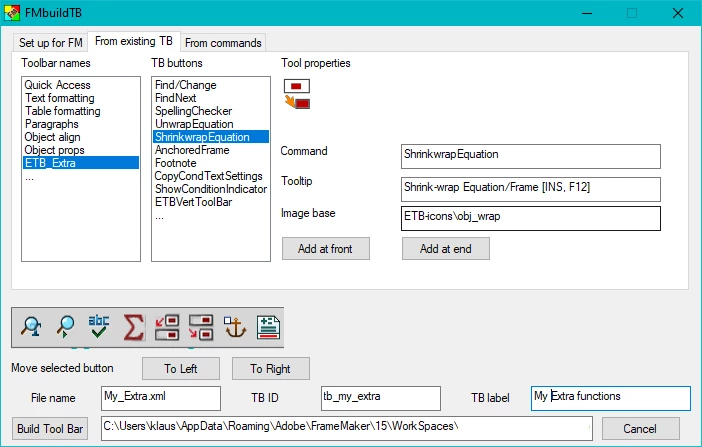
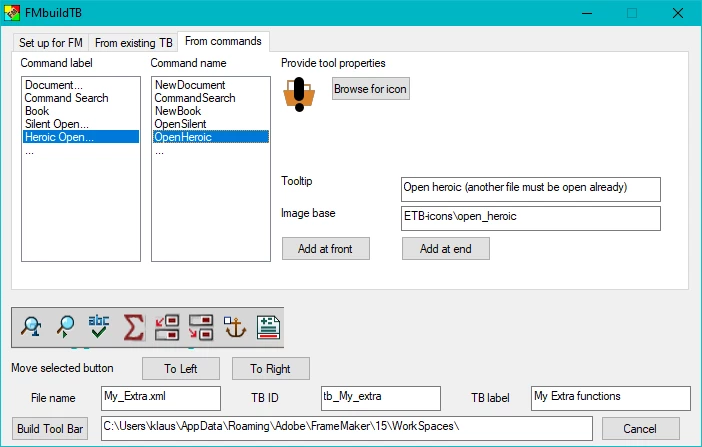
Envisioned UI

There may be multiple FM versions installed, hence a first step will define where to build the TB.
Toolbar entries can be collected from existing tool bars: here we have all necessary data available.
More challenging will be to work from the commands: The icons are in DLLs and their names are not harmonised with the command names. The icons can come from various dlls...
Major obstacles

  • Icons for the built in tool bars are located in dll’s. Hence they must be extracted for the use in the utility. This can be done with ResourceHacker (legally, since FM is not modified).
  • Placing the icons in the UI.
  • Others will come up

→ What do You think about this idea?

I do not have a schedule...

This topic has been closed for replies.

3 replies

Barb Binder
Community Expert
Community Expert
March 2, 2023

Love this, @JonBe. I can avoid it—or at least recognize when I side down and hit it by accident—but my students complain about it so now I have a solution for them! Thanks, 


~Barb

~Barb at Rocky Mountain Training
Barb Binder
Community Expert
Community Expert
February 23, 2023

Sorry, @K.Daube. I missed this thread. Count me in as a promoter. 


Two things I would love to do immedately:

  1. Remove the lock button from the Quick Access toolbar.
  2. Customize the characters available in the Symbols list.


Those are the two most requested customizations in my world, where I work regularly with new FrameMaker users. I'm sure I can think of more that I would like for myself, now that it might be an option.


~Barb

~Barb at Rocky Mountain Training
JonBe
Inspiring
March 2, 2023

Hi @Barb Binder 


A way to remove the lock button, is to comment (or delete) the following lines in C:\Users\[username]\AppData\Roaming\Adobe\FrameMaker\17\WorkSpaces\Structured\WYSIWYGView\toolbars\quick_access.xml and repeat in the other workspaces.

<!-- <ACTION command="Lock" tooltip="Toggle View Only">
	<images base="S_LOCKCLOSED"/>
</ACTION> -->


With symbols, I can see how to remove one or more from the list available, by deleting entries in the menu .cfg file starting with CharBullet. I am not sure how you would add custom entries here.

<Add CharBullet				<Menu SpecialSymbols>>
<Add CharCent				<Menu SpecialSymbols>>
<Add CharCopyright			<Menu SpecialSymbols>>
<Add CharDoubleDagger		<Menu SpecialSymbols>>
<Add CharEllipsis			<Menu SpecialSymbols>>
<Add CharEmdash				<Menu SpecialSymbols>>
<Add CharEndash				<Menu SpecialSymbols>>
<Add CharPlusMinus			<Menu SpecialSymbols>>
<Add CharPound				<Menu SpecialSymbols>>
<Add CharRegister			<Menu SpecialSymbols>>
<Add CharTrademark			<Menu SpecialSymbols>>
<Add CharYen					<Menu SpecialSymbols>>


I developed Extendscripts to provide a list of symbols, used by my customers, which is invoked by a menu item, as shown below.

Well done @K.Daube for the initiative!

Jon

LinSims
Community Expert
Community Expert
January 16, 2023

I love this idea. Being able to customize the toolbar for how I work is right up there with having the workspace set up for how I work as far as usefulness goes.


ETA: and not being able to has been a cause of much under the breath muttering.


Go Klaus!

K.Daube
Community Expert
K.DaubeCommunity ExpertAuthor
Community Expert
January 24, 2023

Lin, after more than a week You seem to be the only promoter of my idea. But you may know the story of the iPhone... I'm already at work - but with the pace of an 80 year old. I will publish progress here.

LinSims
Community Expert
Community Expert
January 24, 2023

Err ... no? I don't use Apple products.


Maybe no one remembers how a lot of the word processing programs let you customize your toolbars, or used to. Being able to have only the functions I use on a regular basis and none of the ones I don't use sounds like paradise to me.