jssortimo
Participant
November 22, 2017
Question

Image getting cut off when converting the fm file to pdf

  • November 22, 2017
  • 3 replies
  • 1580 views

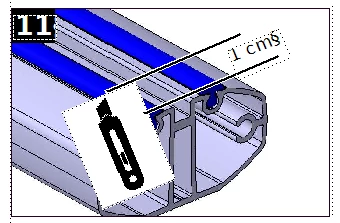
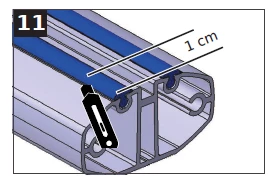
If I rotate an image in FrameMaker and convert the fm file to pdf, then the image is cutted in the PDF. I use FrameMaker version 2015.

I found this problem already in this forum. There was the solution: "rotate the image before you import this file in FrameMaker". This solution doesn't fit to me. True - I can save the images with the necessary rotation, before I import them. My problem is, that I have images like the cutter, which I have to use in different rotations. It can't be the solution, that I save one image in 15 different rotations.

I already tryed other image-formats ond other images like png, pdf, eps. Every time it's the same result.

FrameMaker

PDF

Fileformat
svg 1.0
svg 1.0

I hope you can help me,

Julian

    This topic has been closed for replies.

    3 replies

    Legend
    November 24, 2017

    Just as a follow up here in the forum: I have discussed this with Julian. The effect happens only when saving as a CMYK PDF. It does not happen when you save as an RGB PDF.

    We have created a ticket for this issue in our system (internal ticket number: FRMAKER-3603) and will introduce support for manually rotated graphics in CMYK PDFs in a future release.

    Participant
    March 15, 2018

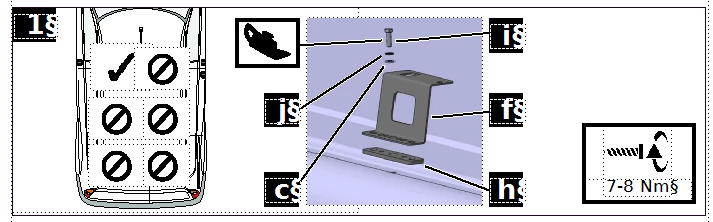
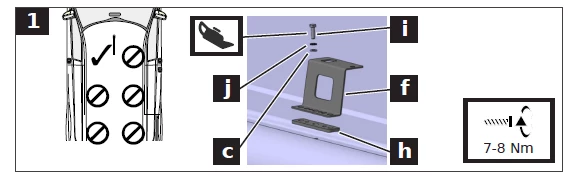
    Any fixes on this issue? I'm having the same problem, but it occurs in CMYK and RGB PDFs. It's far worse in the CMYK PDF, and only a little portion in the RGB PDF.  With the RGB PDF, it's just that little portion between the guidelines in the upper left. I tried enlarging the logo, replacing the logo, putting the logo in master pages, putting the logo in body pages, etc. and nothing works.

    Matt-Tech Comm Tools
    Community Expert
    Community Expert
    March 15, 2018

    Are you using the Adobe PDF driver?

    What is the file format you're using? To me it looks like you have bounding boxes that are getting incorrectly interpreted.

    Does this happen when you have a single image imported, and not rotated?

    -Matt

    -Matt Sullivan, FrameMaker Course Creator, Author, Trainer, Consultant
    Legend
    November 22, 2017

    Ah, just after posting it, I saw the problem. The cutter is cut off at the bottom.

    Can you send me the SVG of the cutter? (gentz at adobe.com)

    Legend
    November 22, 2017

    Hm. I do not really get what is wrong in the PDF compared to the FM document in the examples that you provided. Could you please explain it a little bit more detailed, e.g. highlight in the screenshot from the PDF, what is wrong?