Known Participant
October 26, 2023
Question

Images Blurred in Adobe Frame Maker book.

  • October 26, 2023
  • 2 replies
  • 565 views

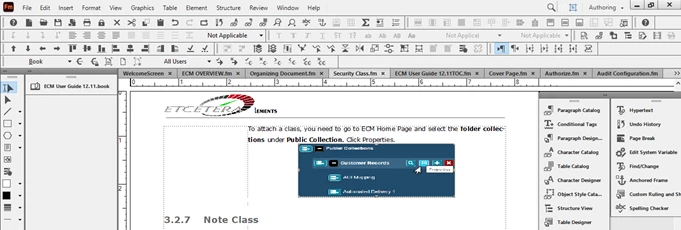
When I insert Images in Adobe Frame Maker Book, it is not clearly visible. Is there any specific way to optimize images  in FM?
 

    This topic has been closed for replies.

    2 replies

    Barb Binder
    Community Expert
    Community Expert
    October 26, 2023

    Hi Amit:


    As you know, I grab screen shots all day long to document answers to questions both here and from my students. I use a 3rd party application called Snagit, which lets me annotate as I go. https://www.techsmith.com/screen-capture.html


    If I were you, I would stop and try to get the screenshot workflow straightened out before you take any more. You may decide you want to use Window's built-in screen capture or a third-party product like Snagit, and you may need to play with your monitor's resolution. Once you figure out how to get clean screenshots, then add a few to your FrameMaker documents, and make sure they output correctly. If not, come back and let us know and we can see if we can be of additional assistance. 


    ~Barb

    ~Barb at Rocky Mountain Training
    Known Participant
    October 27, 2023

    Thank you Barb. I'll try this.

    Bob_Niland
    Community Expert
    Community Expert
    October 26, 2023

    What graphics file format?

    Blurry during edit, in the rendered output, or both?

    If only during edit, this is usually an artifact of FM using the embedded thumbnail in certain file formats, such as EPS.
    If only in the output, this is usually due to down-sampling settings in the workflow.

    Known Participant
    October 26, 2023

    Hi Bob. it is blurry during edit,. JPEG in Anchored frame. Is there any ways to optimize images?

    Bob_Niland
    Community Expert
    Community Expert
    October 26, 2023

    Also blurry to PDF?
    How does the JPG look in an image editor?
    If it's blurry (low res) to start with, FM & the workflow can't fix that.

    It appears that you are inserting screenshots?

    Are you capturing these?
    If so, JPG is not the ideal format, due to edge artifacts from the curve-matching compression (DCT).

    PNG is apt to be less damaged.
