Inspiring
October 17, 2017
Answered

Imported element definitions from EDD don't show in template

  • October 17, 2017
  • 2 replies
  • 1268 views

I followed instructions from another thread to import elements from my EDD to a template, but it didn't work. Only one of the elements from the EDD shows up.

I opened both the template and the EDD, then used File > Import > Element Definitions to bring the element definitions into the template file.

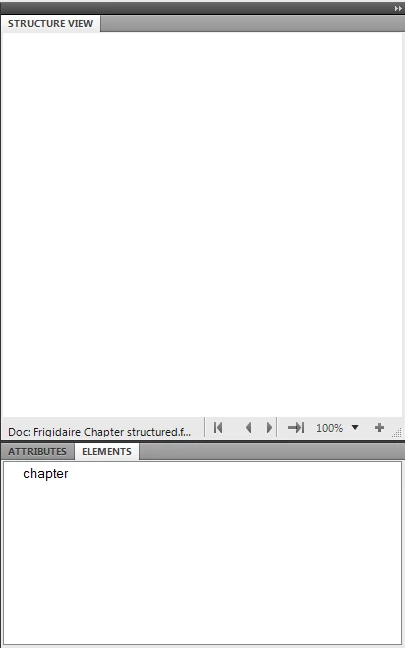
The "chapter" element is the only element I see.

I'm using FrameMaker 10. Not sure what I'm missing in this process.
This topic has been closed for replies.
Correct answer Ian Proudfoot

This looks correct for a structured template with one top level element defined. It is exactly what you need if you are using this template in a structured XML application.

When an XML file is imported it will populate a copy of this template with the structure from the XML. <chapter> will be the root element.

If, on the other hand you are creating new content in a structured FrameMaker document, the chapter element must be added to the document like this:

  1. Select 'chapter' in the ELEMENTS catalog pod.
  2. Click Insert. A new root element will be created which will be visible in the STRUCTURE VIEW pod. You will now see the valid child elements in the ELEMENTS catalog pod.

Note, you can select Options... to change the elements visible in the ELEMENTS catalog pod so that you can see all possible elements if preferred.

I hope that helps?

Ian

2 replies

Ian Proudfoot
Ian ProudfootCorrect answer
Legend
October 17, 2017

This looks correct for a structured template with one top level element defined. It is exactly what you need if you are using this template in a structured XML application.

When an XML file is imported it will populate a copy of this template with the structure from the XML. <chapter> will be the root element.

If, on the other hand you are creating new content in a structured FrameMaker document, the chapter element must be added to the document like this:

  1. Select 'chapter' in the ELEMENTS catalog pod.
  2. Click Insert. A new root element will be created which will be visible in the STRUCTURE VIEW pod. You will now see the valid child elements in the ELEMENTS catalog pod.

Note, you can select Options... to change the elements visible in the ELEMENTS catalog pod so that you can see all possible elements if preferred.

I hope that helps?

Ian

Inspiring
October 17, 2017

Okay, the elements are imported, I just couldn't see them. Still trying to sort out how all of this works.

Inspiring
October 17, 2017

Ted,

1. Despite Ian's comment that your screen capture looks correct, it does show one problem. The Element Catalog window lists the chapter element, but the element tag is not preceded by a checkmark. That indicates that chapter is defined but not permitted at the current location in the document. Is your template empty or does it have existing content? By the way, note that there are four buttons at the bottom of the Element Catalog window (not shown in your screen shot). The Options button brings up the Set Available Elements dialog box (as does the Element > Set Available Elements command). I suspect your document has Show Tags For set to Elements Allowed Anywhere in Parent. You might try the different options and see which one you prefer in various situations.

2. There are various problems with your EDD:

a. Your general rule for chapter is "title | section* | body* | figure* | table* | list* | alert*" which defines a chapter to be a title, zero or more sections, zero or more body elements, or zero or more of any of the other listed elements. It does not allow a chapter to contain different element types. For example, if there is a title no other elements are allowed. You probably want something like "title, (body | figure | table | list | alert)*, section*" which requires a chapter to start with a title that is then followed by any number of body, figure, table, list, and alert elements in any order, which in turn are optionally followed by sections. Nothing after the title is required. There are more complicated expressions that require at least one element after the title. There are parallel problems with the definitions of section and subsection.

b. You've defined img to be a container. I suspect you want it to be a graphic with the required src attribute to name the graphics file you want to import. If so, you should define the element to be a Graphic and not use the attribute. If, as Ian suggested might be the case, you are moving content between FrameMaker and XML, you can define the src attribute in XML only. In such case, you can use read/write rules to specify that img is a Graphic element and map the name of the file imported into FrameMaker to the value of the XML src attribute.

c. Presumably, your table element is used for tables. If so, you need to define it to be a Table rather than a Container; tblHeadRow and tblRow would then be  TableRows and tblData would be a TableCell. Furthermore, FrameMaker requires all table heading rows (even if there is only one) to be grouped into a table heading element and all table body rows to be grouped into a table body element. Thus your general rule for Table should be something like caption, tblHeading, tblBody where tblHeading is a TableHeading with a general rule such as tblHeadRow+ and tblBody is a TableBody with a general rule such as tblRow+. (You might instead use tblRow for both heading and body rows.) One further complication is that if you use caption for the title of a table, you'll need to define it to be a TableTitle rather than a Container. Furthermore, unless you make Figure a Table, you won't be able to use caption for both the title of a table and that of a figure.

--Lynne

Inspiring
October 17, 2017

Ted,

   It is almost impossible to guess what might have gone wrong without seeing your EDD. Did you get any error messages when you imported element definitions?

     --Lynne

Inspiring
October 17, 2017

I don't see an option to attach files, but I can copy and paste the EDD.

Structured Application:

Element (Container): chapter

Valid as the highest-level element.

General rule: title | section* | body* | figure* | table* | list* | alert*

Attribute list

Name: language String Optional

Default: English

Element (Container): section

General rule: title | subsection* | body* | figure* | table* | list* | alert*

Element (Container): subsection

General rule: title | body* | figure* | table* | list* | alert*

Element (Container): title

General rule: <TEXT>

Element (Container): body

General rule: <TEXT>

Element (Container): figure

General rule: img, caption

Element (Container): img

General rule: <EMPTY>

Attribute list

Name: src String Required

Element (Container): caption

General rule: <TEXT>

Element (Container): list

General rule: li

Element (Container): li

General rule: <TEXT>

Element (Container): alert

General rule: <TEXT>

Attribute list

Name: type Choice Optional

Choices: warning | caution | important | note

Default: warning

Element (Container): table

General rule: caption, tblHeadRow, tblRow+

Element (Container): tblHeadRow

General rule: tblData+

Element (Container): tblRow

General rule: tblData+

Element (Container): tblData

General rule: <TEXT>