Inspiring
September 7, 2017
Question

Importing Codes into the FM Document...

  • September 7, 2017
  • 1 reply
  • 734 views

How can I import codes into the Framemaker document?

I need to preserve the spaces in-between the text, such as blank spaces or tabs.

.

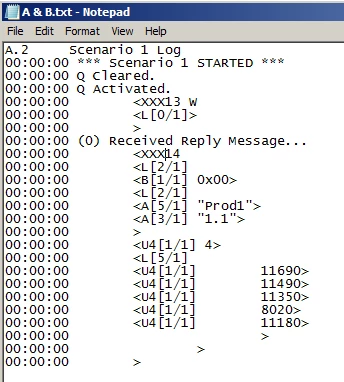
I am provide a .txt file which has 70-100 pages of codes. See example on the right.

I have tried to import text but it removes empty spaces and tabs.

Any suggestion will be appreciated.

Thank you.

    This topic has been closed for replies.

    1 reply

    Legend
    September 7, 2017

    I guess you will need to give a few more details. I just tried to import a sample file into an unstructured FrameMaker Document, and it works fine and all spaces are preserved:

    AixtronAuthor
    Inspiring
    September 7, 2017

    Hi Stefan,

    Can you please explain what are the steps you used to import the text?

    I used File >Import File (Copy into Document).

    Then selected Text option and clicked Convert button.

    Then selected Treat Each Line as Paragraph option and ANSI (Windows) as Encoding.

    Then clicked on Import button. My result is shown in the image below:

    Legend
    September 7, 2017

    I used the exact same way. However, in the txt file I created, I had used spaces, not tabs.

    But as I can see in your screenshot, the tabs are imported just fine in your side as well.

    Try the following which should work for you:

    Create a paragraph style and give it a fitting name like "Code". Then define some tabs in the style. Maybe several like every 0.5 cm or so. Play with what will look best. Then apply the new style to all the code paragraphs.

    You can adjust the tab stop definitions at any time later.

    This should give you the result you want.