

K.Daube
Community Expert
Community Expert
April 18, 2023
Answered

Importing FM doc fails miserably

  • April 18, 2023
  • 2 replies
  • 1026 views

Dear friends,

I try to import an FM file (or later also a txt file) to a text location (current location).

I tried the properties now commented out in the following script, but even with the default import parameters the import does not work. ESTK wheels until i stop it...

► Can you spot my fault?


/* Test_ImportDoc.jsx ====== UTF-8 ======================================
              Import a document or text
History       2023-04-18
*/ ; // =================================================================
#target framemaker
main();

function main() { // ====================================================
var oDoc = app.ActiveDoc;
// have text location defined by cursor placement
  ImportDoc (oDoc, "E:/_DDDprojects/FM-Graphics/FMgraph-examples/insets/legend.fm");
//ImportDoc (oTL, "insets/legend.fm");
//ImportDoc (oTL, "insets/legend.txt");
} // -- end main --------------------------------------------------------

function ImportDoc (oDoc, sFile) { // ===================================
var oTF, bFmImport, lastBSlash, lastDot,
    j, oPgf, oTL, oImpParms={}, oRetParms={}, sFullPath;

  oTL = oDoc.TextSelection.beg;
  if (sFile.toLowerCase().lastIndexOf("fm") < 0 &&
      sFile.toLowerCase().lastIndexOf("mif") < 0 &&
      sFile.toLowerCase().lastIndexOf("txt") < 0) {
    alert ("File to be inserted is not of type fm, mif or txt.");
    return false;
  }
  if (sFile.indexOf (":") !== -1) {           // already full path
    sFullPath = sFile;
  } else {
    lastBSlash = $.fileName.lastIndexOf("/");
    sFullPath  = $.fileName.substring(0, lastBSlash) + "/" + sFile;
  }
// ---------------------------------------------- importing what? -------
  bFmImport = (sFullPath.toLowerCase().lastIndexOf("fm") > 0 ||
               sFullPath.toLowerCase().lastIndexOf("mif") > 0 );
// ---------------------------------------------- handle import ---------
  oImpParms = GetImportDefaultParams();
$.bp(true);
/*
  if (bFmImport) {                                // fm and mif
    j = GetPropIndex(oImpParms, Constants.FS_HowToImport);
    oImpParms[j].propVal.ival = Constants.FV_DoByRef;       // FO_TiFlow
    j = GetPropIndex(oImpParms, Constants.FS_ImportAsType);
    oImpParms[j].propVal.ival = Constants.FV_AUTORECOGNIZE; // FM, MIF
    j = GetPropIndex(oImpParms, Constants.FS_FormatImportedText);
    oImpParms[j].propVal.ival = Constants.FV_EnclosingDoc; // container
  } else {                                        // txt
    j = GetPropIndex(oImpParms, Constants.FS_HowToImport);
    oImpParms[j].propVal.ival = Constants.FV_DoByRef;       // FO_TiText
    j = GetPropIndex(oImpParms, Constants.FS_ImportAsType);
    oImpParms[j].propVal.ival = Constants.FV_AUTORECOGNIZE; // TYPE_TEXT
    j = GetPropIndex(oImpParms, Constants.FS_FileIsText);
    oImpParms[j].propVal.ival = Constants.FV_TextFile_EOLisEOP; // EOL ►
  }
*/
//oRetParms = null;
  oDoc.Import (oTL, sFullPath, oImpParms, oRetParms);      // ESTK wheels
alert ("FA_errno: " + FA_errno);
} //-- end  ImportDoc  --------------------------------------------------


This topic has been closed for replies.
Correct answer Klaus Göbel

Thanks for the tip, Rick - but unfortunately it did not help.

But after I inserted


    j = GetPropIndex(oImpParms, Constants.FS_AlertUserAboutFailure);
    oImpParms[j].propVal.ival = true;


I got the message "Cannot find the file named \e\_DDDprojects\FM-Graphics\FMgraph-examples\insets\legend.fm". I get this from the property $.fileName + the relative path insets\legen.fm.

With the fix file name E:\_DDDprojects\FM-Graphics\FMgraph-examples\insets\legend.fm it works as expected.

► So the FM import is OK now.

When importing a txt file with


    j = GetPropIndex(oImpParms, Constants.FS_AlertUserAboutFailure);
    oImpParms[j].propVal.ival = true;
    j = GetPropIndex(oImpParms, Constants.FS_HowToImport);
    oImpParms[j].propVal.ival = Constants.FV_DoByRef;   
    j = GetPropIndex(oImpParms, Constants.FS_ImportAsType);
    oImpParms[j].propVal.ival = Constants.FV_TYPE_TEXT; 
    j = GetPropIndex(oImpParms, Constants.FS_FileIsText);
    oImpParms[j].propVal.ival = Constants.FV_TextFile_EOLisEOP;


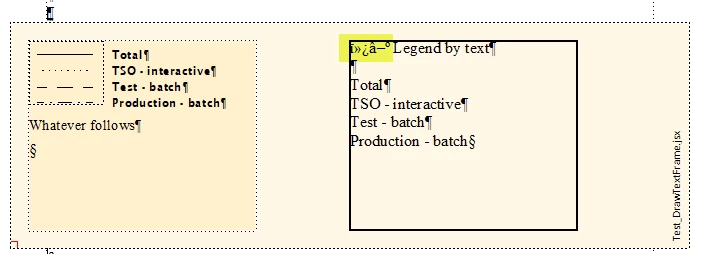
I get the user prompt with dialogue "Unknown File Type", "Text" selected and need to select it. However, this imports as ASCII text, although the file is UTF8 with BOM (leaving the FS_AlertUserAboutFailure setting out creates the already reported error -43):

I don't see any constant to import UTF8 text (only importing XML allows something like this).

If I import by using the UI I get an additional promt (after slecting Text) which provides equivalents to the settings for  FS_FileIsText => FV_TextFile_EOLisEOP and FS_ManualUpdate => true/false. The dialogue also provides a drop down selection for Encoding, whre UTF-8 is preselected (the top entry).

► I'm clueless on this subject...


Add this to your code:

j = GetPropIndex(oImpParms, Constants.FS_ForceImportAsText);
oImpParms[j].propVal.ival = true;


I've tested it and it works.

No idea why , although the documentation says something about MIF. I then just tried it out.

2 replies

K.Daube
Community Expert
K.DaubeCommunity ExpertAuthor
Community Expert
April 20, 2023

Although Klaus Göbel's advice aloowed a further step, in a broader environment I get error -43 (FE_BadParameter: The property list contained an invalid parameter.).  The situation is a nested frame (text frame within anchored frame):

At the time of error you see the cursor (current location) in the correct location (first paragraph of inner frame).

I have checked the parameters of the Import statement as far as I can (oTL, sFullPath) - but can not check what's wrong with the oImpParms. oImpParms.ObjectValid() is not a valid function.

var oTF, bFmImport, lastBSlash, j, oPgf, oTL, oImpParm, oRetParms, sFullPath;
//....
  oImpParms = new PropVals();
  oImpParms = GetImportDefaultParams();
    j = GetPropIndex(oImpParms, Constants.FS_HowToImport);
    oImpParms[j].propVal.ival = Constants.FV_DoByRef;       // FO_TiFlow
    j = GetPropIndex(oImpParms, Constants.FS_ImportAsType);
    oImpParms[j].propVal.ival = Constants.FV_AUTORECOGNIZE; // BIN, MIF
    j = GetPropIndex(oImpParms, Constants.FS_FormatImportedText);
    oImpParms[j].propVal.ival = Constants.FV_EnclosingDoc; // container
  oRetParms = new PropVals()
  oDoc.Import (oTL, sFullPath, oImpParms, oRetParms);
alert ("FA_errno: " + FA_errno);

 ► How can i check the details of oImpParms?

frameexpert
Community Expert
Community Expert
April 20, 2023

I would try another value for FS_ImportAsType. If you are importing a FrameMaker document, try Constants.FV_TYPE_BINARY.

K.Daube
Community Expert
K.DaubeCommunity ExpertAuthor
Community Expert
April 20, 2023

Thanks for the tip, Rick - but unfortunately it did not help.

But after I inserted


    j = GetPropIndex(oImpParms, Constants.FS_AlertUserAboutFailure);
    oImpParms[j].propVal.ival = true;


I got the message "Cannot find the file named \e\_DDDprojects\FM-Graphics\FMgraph-examples\insets\legend.fm". I get this from the property $.fileName + the relative path insets\legen.fm.

With the fix file name E:\_DDDprojects\FM-Graphics\FMgraph-examples\insets\legend.fm it works as expected.

► So the FM import is OK now.

When importing a txt file with


    j = GetPropIndex(oImpParms, Constants.FS_AlertUserAboutFailure);
    oImpParms[j].propVal.ival = true;
    j = GetPropIndex(oImpParms, Constants.FS_HowToImport);
    oImpParms[j].propVal.ival = Constants.FV_DoByRef;   
    j = GetPropIndex(oImpParms, Constants.FS_ImportAsType);
    oImpParms[j].propVal.ival = Constants.FV_TYPE_TEXT; 
    j = GetPropIndex(oImpParms, Constants.FS_FileIsText);
    oImpParms[j].propVal.ival = Constants.FV_TextFile_EOLisEOP;


I get the user prompt with dialogue "Unknown File Type", "Text" selected and need to select it. However, this imports as ASCII text, although the file is UTF8 with BOM (leaving the FS_AlertUserAboutFailure setting out creates the already reported error -43):

I don't see any constant to import UTF8 text (only importing XML allows something like this).

If I import by using the UI I get an additional promt (after slecting Text) which provides equivalents to the settings for  FS_FileIsText => FV_TextFile_EOLisEOP and FS_ManualUpdate => true/false. The dialogue also provides a drop down selection for Encoding, whre UTF-8 is preselected (the top entry).

► I'm clueless on this subject...

Klaus Göbel
Legend
April 18, 2023

Hi Klaus,

with one change, it works for me:

oRetParms={} -> oRetParms=new PropVals()

K.Daube
Community Expert
K.DaubeCommunity ExpertAuthor
Community Expert
April 18, 2023

Many thanks, Klaus - one step further: I get FA_errno = -82 (with my paramters or the defaults) - which means:
The script specifies an import flow that does not exist.

Obviously my imported file is damaged - and I made a new one which works as expected.

Thank You!