
March 3, 2017
Question

Importing graphic into graphics frame on a Reference page

  • March 3, 2017
  • 1 reply
  • 423 views

Hello All,

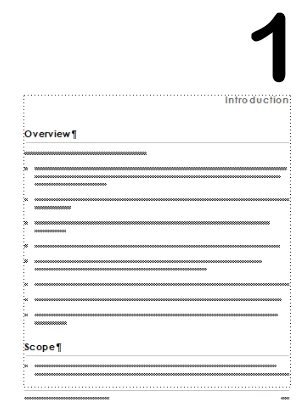
Need to import a graphic (by copy) into a graphics frame located on a Reference page of the document. The objective is to have a number for each chapter on the First Master Page. This is done by using 'Frame Above Pgf' of the Paragraph Tag. This works fine manually, as shown below. I would like to have a generic chapter FM file where I can change the chapter number according to the value of <$chapnum>.

Is there a way to import the graphic (number) into the graphics frame? I see Import, but it requires a TextLoc that I don't have.

Any help is greatly appreciated.
#target framemaker

var oDoc, oPage, oFrame, oGfx;

var oDoc = app.ActiveDoc;

if (oDoc.ObjectValid()){

    //

    oPage = oDoc.FirstRefPageInDoc;

    while (oPage.ObjectValid()) {

        alert(oPage.Name);

        oFrame = oPage.PageFrame;

        if(oPage.Name == 'Reference Page 2'){

            oGfx = oFrame.FirstGraphicInFrame;

            if(oGfx.ObjectValid()){

                while (oGfx.ObjectValid()){

                    if (oGfx.constructor.name == 'UnanchoredFrame'){

                    alert(oGfx.Name);

                    }

                oGfx = oGfx.NextGraphicInFrame;

                }

           }

        }

        oPage = oPage.PageNext;

    }

}

This topic has been closed for replies.

1 reply

4everJang
Legend
March 3, 2017

This seems to be a very complicated way of doing something that FrameMaker does out of the box. Add a text frame to the first master page, enter a Running H/F variable, style it in any which way you want, and assign the <$chapnum> variable to the Running H/F defnition. Switch back to body page. Done.

Correct me if I did not understand the use case. I have been using Running H/F for all kinds of automated references to chapter numbers, page numbers, even paragraph numbers. Almost no end to what you can do with them.

Cheers

March 3, 2017

Thanks 4everJang​,

We whole idea was to create a 'hollow' font in order to use less ink. Don't see how that can be achieved with a standard Windows font.

You're idea works fine and probably I'll modify the master page as per your suggestion.

Cheers.