
Participant
January 7, 2025
Question

Importing SVG files to FM2022 (v17) distorts the SVG

  • January 7, 2025
  • 3 replies
  • 168 views

Hello,

I'm trying to import an SVG file created in TimeGen (timing diagram software) to FM2022 (v17). When I import the file, FM inserts extra white space around some text, as you can see here (marked in yellow):
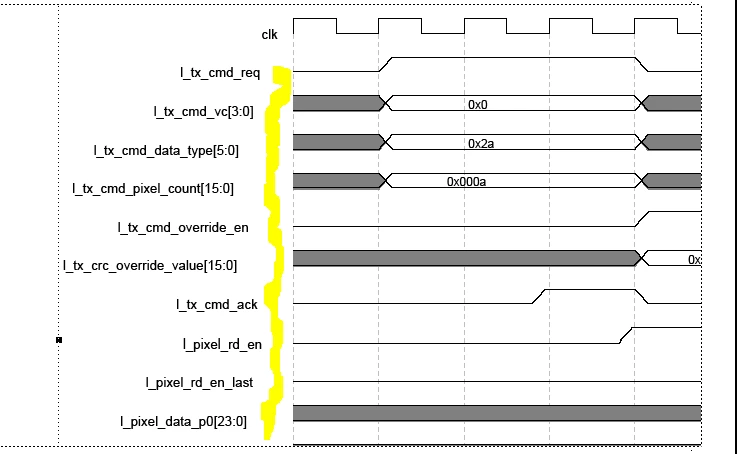
When I open the SVG using a browser, the extra space is not there: 
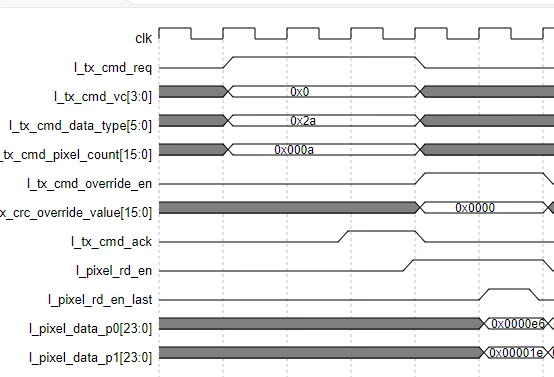
The extra space can be seen when I create a pdf of the FM file. 

Interestingly, my colleagues, who have the exact same version of FM, do not have this issue when they import the same files. 

Any ideas why this might be happening, please? 

Thanks

    3 replies

    Community Expert
    January 7, 2025

    Hm. I encounter a similar SVG issue when there is a space in the text.

    Adobe says that this would be fixed, but it isn't.

    https://tracker.adobe.com/#/view/FRMAKER-12723

    Bob_Niland
    Community Expert
    Community Expert
    January 7, 2025

    It looks to me like the problem is font metrics, due to a font substitution. The starting X-Y coordinates of the text are the same, but the point size and resulting spread aren't.

    Unlike EPS, SVG font declarations & embedding (if any) doesn't seem to be reliable yet, in FM or on the web. In my vector work, often in Illustrator, one of the last steps before saving-as to SVG, I select all (or at least all text) and Convert to Outlines. It's no longer selectable text, but it presents as intended.

    Jeff_Coatsworth
    Community Expert
    Community Expert
    January 7, 2025

    If that's the case, then I would have a look at their maker.ini settings compared to yours (remember, there's 2 of them - one in AppData and one in the \Program Files\ factory load directory).