
Participating Frequently
March 5, 2020
Question

In FM 12 strct environment, how to add a new value to the attribute of a pre-existing element?

  • March 5, 2020
  • 1 reply
  • 876 views

My main problem is that I don't know Where (what dialog that I can make appear) I make the edit from at this stage.


Goal: I am missing an attribute value for an Element titled "SafetyMsg" that I wish to add. The missing value is "WarningElectrical".


The SafetyMsg element currently has an Attribute Name titled "a_Type", containing 3 values: Danger, Warning, and Caution. See pic:
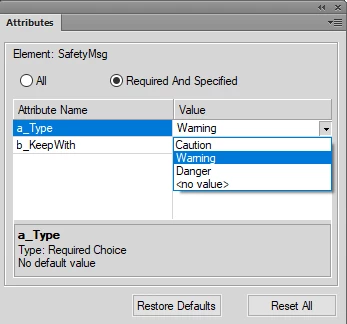
 

My issue is that I want to add a 4th value, WarningElectrical, to the drop-down list above.


Very importantly, each of these values contains a framed graphic in the Reference Page (the 3 that work along with the new WarningElectrical value).

Here's a pic of WarningElectrical on the Ref page (bottom menu viewable so you can see its name):
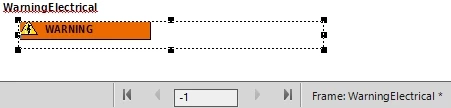
 

Note: WarningElectrical uses a different yellow triangle graphic than the other values although its still a warning.


Please list steps so I can access how to add this value to the SafetyMsg element.


Huge Thanks for your time!

    This topic has been closed for replies.

    1 reply

    frameexpert
    Community Expert
    Community Expert
    March 5, 2020

    Structured FrameMaker templates are controlled by an EDD (Element Definition Document) that someone developed. You have to add the new value to the EDD and then import the element definitions into the document (File > Import > Element Definitions). Typically, you have someone that maintains the EDD and template and can update it for you. If you have other processes that import or export data from your documents, you may have to make other adjustments; for example you may have to update a related DTD.


    If you don't have an EDD, you can extract one from the current document by choosing StructureTools > Export Element Catalog as EDD.

    www.frameexpert.com
    Participating Frequently
    March 5, 2020

    This is the right track. Thank You frameexpert.

    Really need you. Have never edited EDD before.


    So...

    I extracted the EDD as requested.

    Then I added "WarningElectrical" text to the Attribute list, as shown below:

    I made No Other Edits to EDD file. Then I imported the EDD file back to the book file.


    At this point FM brought up screen shot below. I looked at this and clicked Done. (Not sure if this was correct.  What should I have done instead??)

    Lastly I opened up fm file to see if WarningElectrical was now a value in "a_type" attribue (for SafetyMsg element). Answer: no. Not there. Yet.

    Plan: I believe I need to make further edits to EDD. Unless hear different (meaning I haven't done anything wrong so far), will go back and search for "a_type" to see text related to the other 3 values and try and do something similar for WarningElectrical.

    Please say if see anything wrong with what I've written above.

    Thanks!

    frameexpert
    Community Expert
    Community Expert
    March 5, 2020

    Import the element definitions into the document you are trying to edit and see if it shows up.

    www.frameexpert.com