


Question
In FM 2017, the status bar doesn't display an override correctly
My issue: Wrong display of a character override in the status bar
- Create a blank document.
- Open the Character Designer.
- Create a new tag, i.e. 'RedTest' -> All settings: 'As Is' + Color: 'Red'.
- Press 'Create Style'.
- Fill in some characters on the page, i.e. '1234567890'.
- Select a few characters, i.e. '567'.
- Character Catalog: Apply 'RedTest'.
So far - so good:
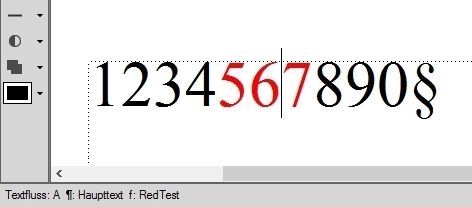
- Select a character, i.e. '6'.
- In the Character Designer, change a property of 'RedTest', i.e. Size: '18 pt'.
- Press the 'Apply' button.
In case of a character tag override: "An asterisk displays next to the character tag name in the status bar." (Matt Sullivan's 'Working with Content'). But no asterisk appears in my status bar:
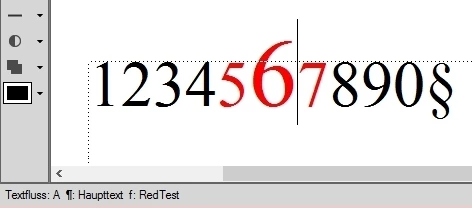
Who is wrong? Adobe, the book, or me?
 AdChoices