
February 18, 2018
Answered

In FrameMaker 2017, Text insets can damage paragraph tags

  • February 18, 2018
  • 2 replies
  • 726 views

I tried to learn more about text insets in FrameMaker. This is what happened:

  • I've linked a simple module file TextInset.fm into a container file Test.fm.
  • Then I selected and deleted the inset in the container file.
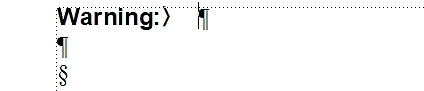
"Warning:" is an entry in the paragraph tag's Autonumbering. So far - so good.

  • Now I tried to change the paragraph tag of the first line. But nothing happened. The line still keeps the Autonumbering and, of course, the whole tag:

  • I deleted the Autonumbering Format on the Numbering sheet of the Paragraph Designer and deactivated Autonumber Paragraphs. But the f*** Autonumbering is still alive:

Is it me who's wrong? Or is this another FM bug?

Btw:

This was just a very simple test. Anyone out there, who is seriously using text insets in FM, and is NOT thinking about suicide or killing FrameMaker?

    This topic has been closed for replies.
    Correct answer Winfried Reng

    Hi,

    I do not know why this happens, but sometimes the paragraph which holds the text inset gets an additional tag <PgfLocked Yes>.

    With this tag you cannot change the paragraph format of the particular paragraph.

    You can see this tag when you convert your FrameMaker file to MIF and open the MIF file in a text editor and search for the text in the paragraph. (E.g. enter xxx or something like this in the paragraph before you save as MIF.)

    When you delete this tag in the MIF file and save and open the MIF file in FrameMaker, then everything should work again.

    Best regards

    Winfried

    2 replies

    Ian Proudfoot
    Legend
    February 21, 2018

    I tried to reproduce the problem, but without matching your results.

    How did you manage the settings for the formatting of the text inset? Did it use the source formatting or that from the container document?

    When you say "Now I tried to change the paragraph tag of the first line." Do you mean you tried to select a different paragraph format from the Paragraph Catalog, or you changed the settings for that paragraph in the Paragraph Designer?

    After you deleted the autonumber properties for the Para format, did the Paragraph designer still show the autonumber settings after you clicked Apply or Update Style?

    Legend
    February 18, 2018

    Well, there are probably some 100 million FrameMaker documents in the world using text insets. I guess if all their authors would have commented suicide, there would be not a lot of tech writers left ;-)

    But jokes aside: It’s a little bit difficult to understand with this description what you are trying to do. Are you saying that you cannot change the style definition of a paragraph in the container document that had a text inset linked into after deleting this text inset?

    Winfried RengCommunity ExpertCorrect answer
    Community Expert
    February 21, 2018

    Hi,

    I do not know why this happens, but sometimes the paragraph which holds the text inset gets an additional tag <PgfLocked Yes>.

    With this tag you cannot change the paragraph format of the particular paragraph.

    You can see this tag when you convert your FrameMaker file to MIF and open the MIF file in a text editor and search for the text in the paragraph. (E.g. enter xxx or something like this in the paragraph before you save as MIF.)

    When you delete this tag in the MIF file and save and open the MIF file in FrameMaker, then everything should work again.

    Best regards

    Winfried

    Bob_Niland
    Community Expert
    Community Expert
    February 21, 2018