In Table: Make first 2 Rows as Heading...
In existing Table:
How can I make first two rows as a Heading Rows, so it can be repeated on every page???
Could not find this option on Table Designer or Paragraph Designer.
Thanks.

In existing Table:
How can I make first two rows as a Heading Rows, so it can be repeated on every page???
Could not find this option on Table Designer or Paragraph Designer.
Thanks.
> The existing table has no Heading Row.
Create a new empty table of the named format, with the desired number of various rows and columns.
Save the file.
Select and cut* the content out of the old table.
Paste it into body row 1 of the new one.
Delete old table.
Add text to new heading row(s).
Or learn to hack tables in MIF.
Yup. This is a shortcoming of FM's table support.
______
* Copy is OK as long as there are no Markers in the table.
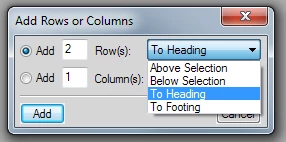
Even easier, when the table is selected, use Table > Add Rows or Columns... and then specify the number of heading rows required:

Then just cut & paste the rows into the new heading rows.
Already have an account? Login
Enter your E-mail address. We'll send you an e-mail with instructions to reset your password.