
Participant
March 4, 2022
Question

Include section heading number in a table title

  • March 4, 2022
  • 4 replies
  • 329 views

Hi,

I'm fairly new to Framemaker 2020 so hopefully this question will have a simple answer.

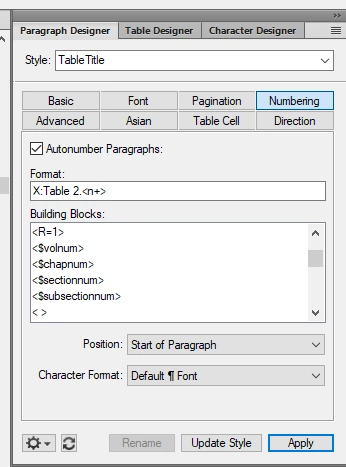
I'm creating a multi section document that includes numerous tables in each section. what I want to do is include the section heading number in the table. I can do this manually by going into the Paragraph Designer, Numbering and physically typing in the Section number as shown below.
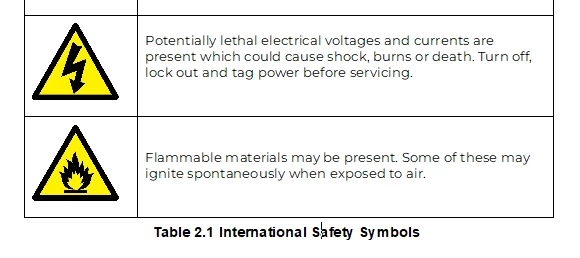
This then gives me the following in the table title:
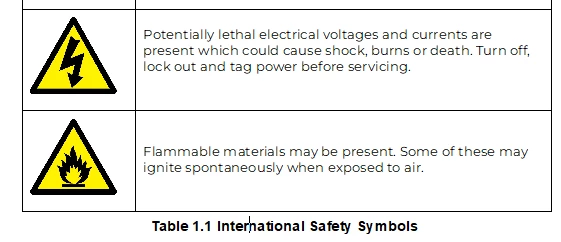
Replacing the  "2" with either <$chapnum> or <sectionnum> simply resets the table to 1:
How can I get the table title to reflect the section number? Any advice will be most appreciated.

:

    This topic has been closed for replies.

    4 replies

    Dave Creamer of IDEAS
    Community Expert
    Community Expert
    March 4, 2022

    Are your sections separate files? If so, putting the files into a book will insert the proper <$chapnum> number. (Every file thinks it is chapter 1 (one) until the book order says otherwise. 


    I've attached an Excel file demonstrating how I set up numbering. It doesn't show Table numbering directly, but the concept is the same for all numbering sequences. It comes down to making sure each numbering sequence has a unique identifier. 


    Check out some free video-based training here: https://www.adobe.com/products/framemaker/resources.html

    For live, hands on training, there are a number of FrameMaker instructors on this list if you post a request. (Adobe used to have a list of Adobe Certified Instructors, but they recently dropped certification listings for most of their software.)


    David Creamer: Community Expert (ACI and ACE 1995-2023)
    frameexpert
    Community Expert
    Community Expert
    March 4, 2022

    How are you numbering your sections? Are you using an autonumber to number them? If so, send a screenshot of the Autonumber tab of the Paragraph Designer for that format.

    Participant
    March 4, 2022

    Thanks I'll take a look this evening.

    frameexpert
    Community Expert
    Community Expert
    March 4, 2022

    You probably don't need as much detail to solve your immediate problem, but if you have more understanding about how autonumbers work, it will be useful to you as you continue to work with FrameMaker.

    frameexpert
    Community Expert
    Community Expert
    March 4, 2022