
Known Participant
December 26, 2023
Answered

Inconsistent Numbering properties in Frame Maker Book

  • December 26, 2023
  • 3 replies
  • 1113 views

Hi, I am getting an error message "inconsistent numbering properties" when updating Book even if I have taken all the required steps like:

  • Updated numbering properties of all chapters
  • Updated the numbering properties of first chapter
  • Updated page number
  • Updated the page number of first page.
  • kept/Imorted same formats to all chapter.
  • Selected the book and then upadted it.  

Yet I am getting this error message below. Please suggest solution.
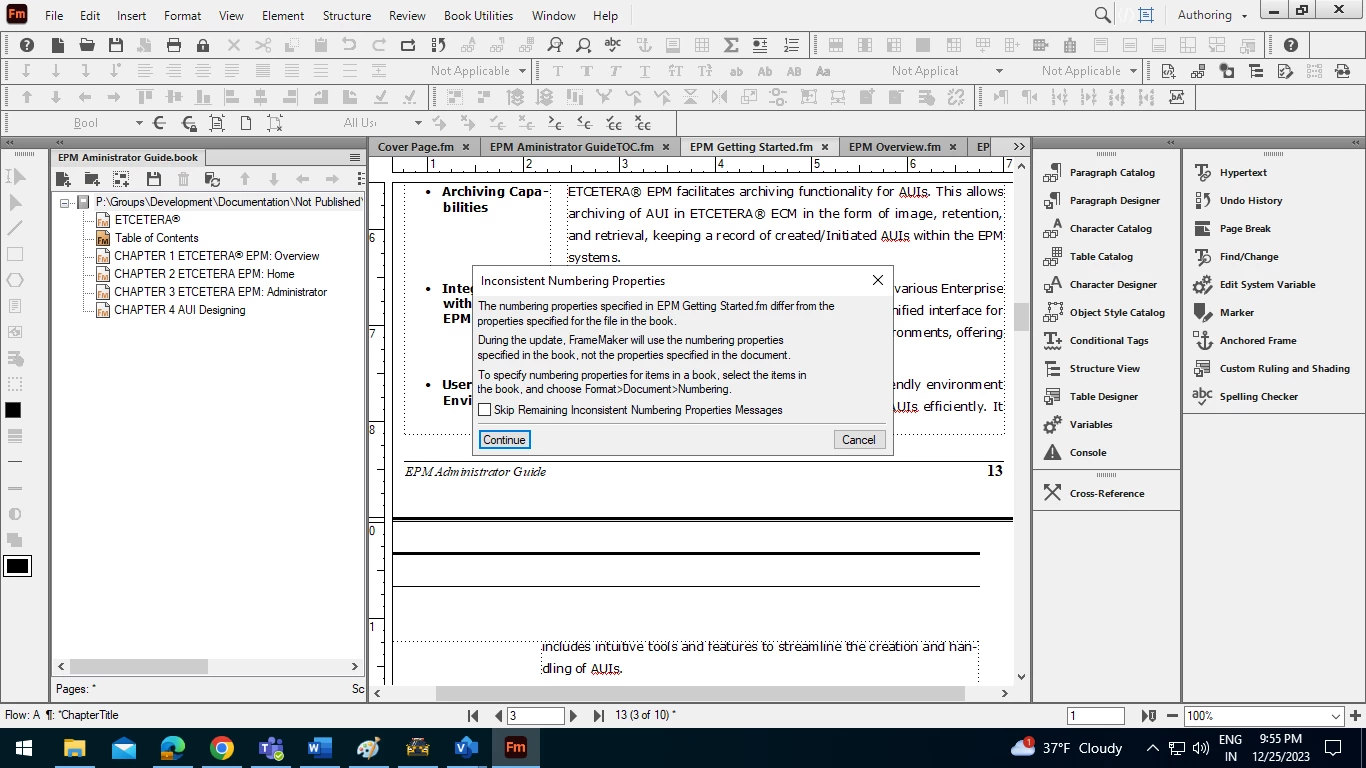
Thanks,

Amit



    This topic has been closed for replies.
    Correct answer Bob_Niland

    A usual suspect in that error is that the Numbering Properties in the Book menu, for each component file, don't match the
    Format 🞃 Document » Numbering…
    in each component file.
    One fix is, in the Book menu, to elect, for each /Tab\
    ⦿ Read from File

    3 replies

    Matt-Tech Comm Tools
    Community Expert
    Community Expert
    August 16, 2024

    Bob's method of using Read from File will definitely work, but using the book file to manage the numbering fits my workflow better.

    I usually see an Inconsistent Numbering Properties message when developing or applying a template. I ignore it, because setting the numbering as you wish in the book file, then updating the book and saving all files will pass the book's numbering properties to each of the files and resolve the need for the message.

    The message has shown up in every FrameMaker class I've ever taught, and I tell my students that it's like when a teacher sends home a note because the story of a parent and child don't match... the teacher is inclined to believe the parent, and will act accordingly. In this case, the parent is the book file, and rightly informs the behavior of the child(ren).

    -Matt Sullivan, FrameMaker Course Creator, Author, Trainer, Consultant
    frameexpert
    Community Expert
    Community Expert
    December 26, 2023

    I have a series of short videos that give an overview of FrameMaker pagination:

    https://youtu.be/AiI1DOoA6Ug

    Bob_Niland
    Community Expert
    Bob_NilandCommunity ExpertCorrect answer
    Community Expert
    December 26, 2023

    A usual suspect in that error is that the Numbering Properties in the Book menu, for each component file, don't match the
    Format 🞃 Document » Numbering…
    in each component file.
    One fix is, in the Book menu, to elect, for each /Tab\
    ⦿ Read from File

    Known Participant
    December 27, 2023

    This worked. Thanks Bob.