Inspiring
March 26, 2013
Answered

Incorrect/No Table Sorting

  • March 26, 2013
  • 3 replies
  • 2030 views

I have a table with 3 columns.  It had been sorted by the first column (CR Number).  That works fine.

I am now attempting to sort by the third column instead.  A portion of the result is shown below.  It refuses to sort at all, either ascending or descending.  I can still successfully sort by the first column.  Why not this one?

Its not that it is sorting according to some odd rule, its not sorting at all by this column.  I have turned off sorting by any other column but this.

R-Click on table - Sort = Row Sort - Ascending - Only the In Build column is chosen.

The entries are copied and pasted so there should not be any hidden typos or characters to cause this.  I even remade some of the entries to be sure, but it still refuses to sort by this column.

Does anybody have any idea why?

Thanks.

P.S. FM 11 -  Windows 7
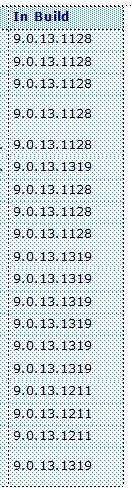
Addendum - After further testing, it is clearly the data itself that FM has an issue with.  Both other columns sort correctly, but this one does not sort at all.

    This topic has been closed for replies.
    Correct answer Arnis Gubins

    It looks like a bug. I just tested this with various scenarios of periods in a numeric sequence. If any of the first two sequences (e.g. xx.yy.nn.nnn)  have different xx and yy values, then FM does sort these items.

    FM seems to be looking left-to-right and is doing an alpha sort. It assumes they're all sorted if the third sequence (e.g. xx.yy.zz.nnn - the zz term) is also the same in all terms, i.e. it's not looking past the third period to see the remaining "nnn" terms.

    Please file this as a bug at: https://www.adobe.com/cfusion/mmform/index.cfm?name=wishform&product=63

    3 replies

    Participating Frequently
    March 27, 2013

    It seems to me that the error does not occur if the decimal separator in the system control is changed from period to comma (FM restart required).

    Participating Frequently
    March 27, 2013

    Is the comma the expected decimal separator in the language of your FM release? Does this fix the problem in only one language? Perhaps users here using different languages could test this and shed a bit more light.

    HTH

    Regards,

    Peter

    _______________________

    Peter Gold

    KnowHow ProServices

    Klaus Müller wrote:

    It seems to me that the error does not occur if the decimal separator in the system control is changed from period to comma (FM restart required).

    Participating Frequently
    March 27, 2013

    Hi Peter,

    Comma is the default decimal separator in my OS language (German). That's why I could not reproduce the erroneous sorting at first.
    The languages my FM releases (English and German) doesn't matter regarding this problem.

    Obviously, FrameMaker tries to do an intelligent numeric sorting.

    To prevent this, one could temporarily change the decimal separator in the system control – or in the string to sort.

    Another workaround to force a string based sorting: Inserting a non-breaking space (or numeric space, or thin space ...) before or after the strings to sort.

    Kind regards,
    Klaus

    dcrouse10Author
    Inspiring
    March 26, 2013

    I was afraid it was a bug.  Sigh.

    It does sort fine in Excel and Word, just not in FM.

    I have trimmed the column to just the last 2 blocks and it is working, although that is not a long term solution.

    I will post it as a bug. 

    Thanks.

    Matt-Tech Comm Tools
    Community Expert
    Community Expert
    March 26, 2013

    Is there a chance that the common numbers could exist as autonumbering? That would allow you to sort the entries, while still maintaining the formatting.

    -Matt

    Matt R. Sullivan
    co-author Publishing Fundamentals: Unstructured FrameMaker 11
    P: 714.960.6840 | C: 714.585.2335 | matt@mattrsullivan.com

    @mattrsullivan LinkedIn facebook mattrsullivan.com


    -Matt Sullivan, FrameMaker Course Creator, Author, Trainer, Consultant
    dcrouse10Author
    Inspiring
    March 26, 2013

    What I ended up doing was to split the column in 2, with the 9.0. bit in one, and the meat in the other.

    With a bit of fiddling with spacing, and spanning the title across both columns, it comes out looking a lot like it did originally, and is properly sorted to boot.

    It's a bit clunky, but it will do for now.

    Bug report submitted.

    Thanks to all.

    Arnis Gubins
    Arnis GubinsCorrect answer
    Inspiring
    March 26, 2013

    It looks like a bug. I just tested this with various scenarios of periods in a numeric sequence. If any of the first two sequences (e.g. xx.yy.nn.nnn)  have different xx and yy values, then FM does sort these items.

    FM seems to be looking left-to-right and is doing an alpha sort. It assumes they're all sorted if the third sequence (e.g. xx.yy.zz.nnn - the zz term) is also the same in all terms, i.e. it's not looking past the third period to see the remaining "nnn" terms.

    Please file this as a bug at: https://www.adobe.com/cfusion/mmform/index.cfm?name=wishform&product=63