
Inspiring
September 4, 2018
Answered

Indent

  • September 4, 2018
  • 1 reply
  • 1284 views

I'm try to keep an indent the same around a graphic box when I switch from side to side. My graphic are all located on the side close to the binding. On one page all my indents work fine. On the other page they are all jammed up. Is there a setting to change this?
    This topic has been closed for replies.
    Correct answer ericCessna

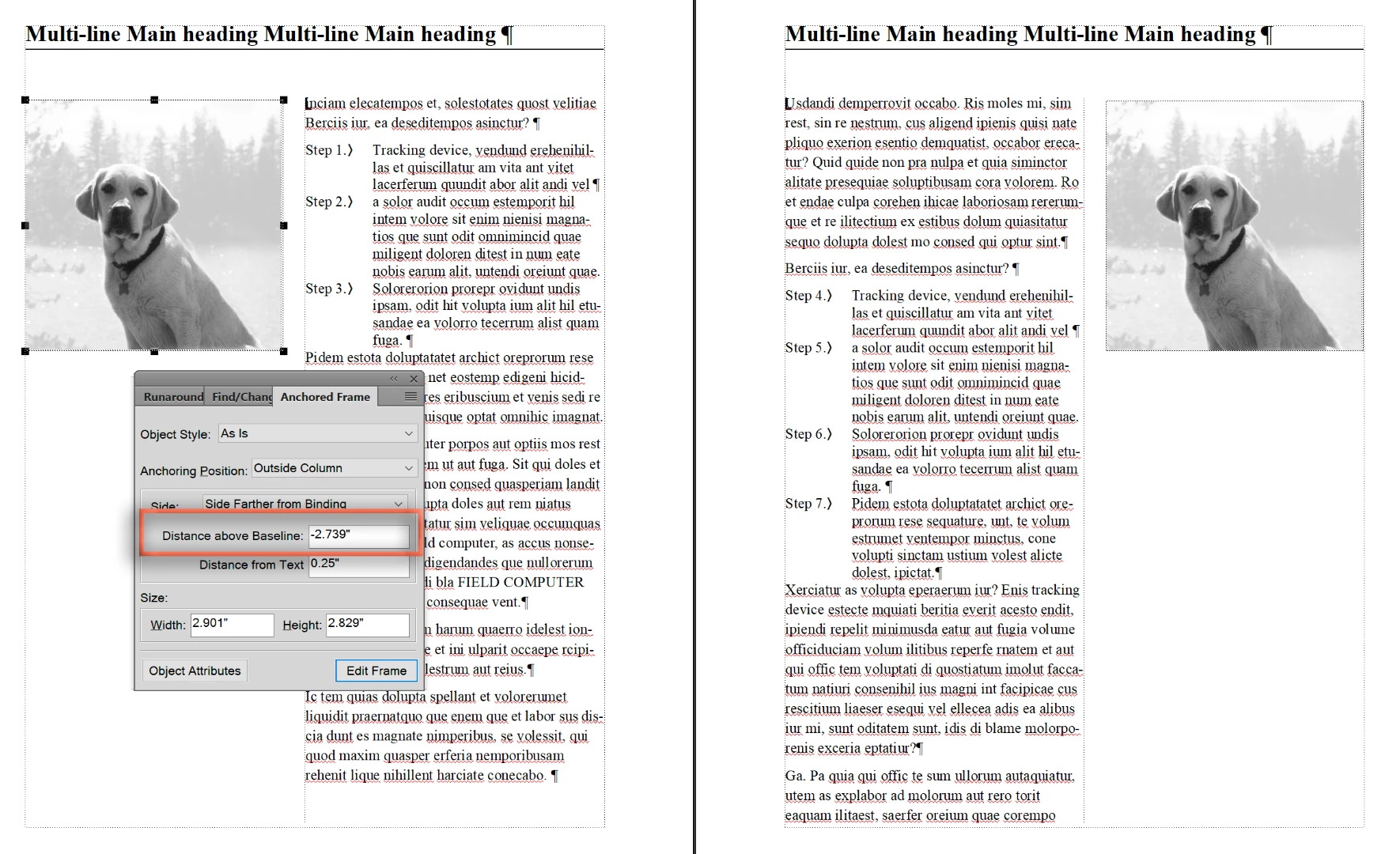
    Again, clarifying... is this what you are looking for?

    If yes, set the title to Across All Columns and Sideheads (Paragraph Designer > Pagination), and define a negative distance above baseline for the anchored frame.

    ~Barb


    It looks like we are on the right track. I think I can figure the rest out. Thank you so much

    1 reply

    Barb Binder
    Community Expert
    Community Expert
    September 4, 2018

    Hi Eric:

    Can you share a screen shot of a 2-page spread so that we can see the frames that are working and the ones that are not? Are you using anchored frames with the position set to Run Into Paragraph? Or are you actually using paragraph indents?

    ~Barb

    ~Barb at Rocky Mountain Training
    Inspiring
    September 5, 2018

    Bard,

    All my graphics are anchored frames set to Run into Paragraph and To align Side Farther from Binding. As I go from step to step I go from the step with my indent to step without an indent. I would like to keep the indent without a special Right and Left format.

    Thank You

    Eric Schaffer

    Service Training Instructor

    Customer Support Division - Training Department

    Yanmar America Corporation

    [contact details removed by moderator]

    Barb Binder
    Community Expert
    Community Expert
    September 5, 2018

    Hi Eric:

    That is how I would approach it as well, and here is the result as the image moves from left to right.

    What I'm looking for is a screen shot so I can see what is happening with your layout. Note that you can't add a screen shot if you reply via email. Please follow the link and reply in your browser.

    ~Barb

    ~Barb at Rocky Mountain Training