Participating Frequently
March 21, 2017
Answered

Index issues

  • March 21, 2017
  • 1 reply
  • 963 views

I have two question:

1. I created a standard index,but don't know how to  the page number.

I don't have a index related reference page.

2. How to include the index in the table of content?

    This topic has been closed for replies.
    Correct answer Barb Binder

    Dear BarbBinder,

    I am sorry I didn't make it clear. I have created a standard index into the book and the page number is included. but the format of the page number is not what I want. How can I change the page number format?


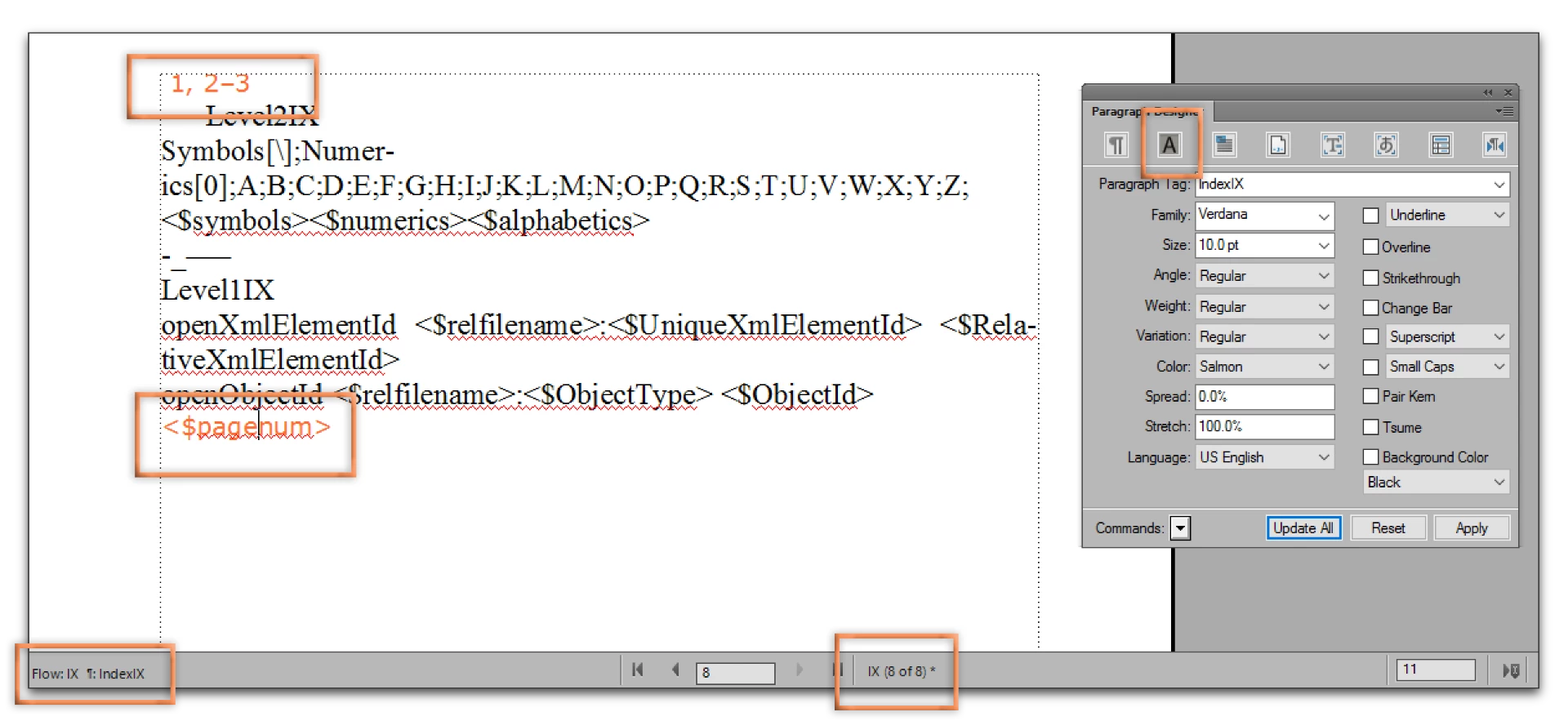
    To change the look of the page numbers after the index entries:

    1. Open the index file.
    2. View > Reference pages
    3. Navigate to the IX reference page (often the last reference page)
    4. Click on the <$pagenum> building block (which controls the page numbers) and format the IndexIX ¶ tag to look the way you want.
    5. Update All
    6. When you update your book, the reference pages changes will take effect.

    Note: you will want to format the Separators tag the same way. Click the first line and assign the same formatting. The separators control the spacing between the numbers, but also the commas and en dashes. Normally, you want the same typeface, size and style for those characters that you have selected for the page numbers.

    1 reply

    Barb Binder
    Community Expert
    Community Expert
    March 21, 2017

    1. I created a standard index,but don't know how to  the page number. I don't have a index related reference page.

    Add the page numbers to the master pages of the IX.fm file.

    2. How to include the index in the table of content?

    If your TOC is already set up, and you just want to add the IndexTitle, right click the TOC.fm file in the book window > Set up Table of Contents. Scroll through the list on the right, and double click the IndexTitle (or whatever you called the title of the index) to add it to the TOC. Update the book. You will then need to format the IndexTitleTOC tag.

    ~Barb at Rocky Mountain Training
    Jean LiuAuthor
    Participating Frequently
    March 22, 2017

    Dear BarbBinder,

    thank you for your help.

    For question no.1, can you advice how to add the page no. in the master page? I want to format the page number. I read a book to say that this should be done inthe reference page.

    for questio no.2 I will create an index toc tag and try your method.