Susan305351693t3o
Inspiring
December 5, 2024
Answered

Inserting a Page Break In FrameMaker 2020

  • December 5, 2024
  • 4 replies
  • 2053 views

I cannot find a current answer to this question. In any other program, it would be incredibly simple, and it APPEARS to be simple in FrameMaker, but it isn't.

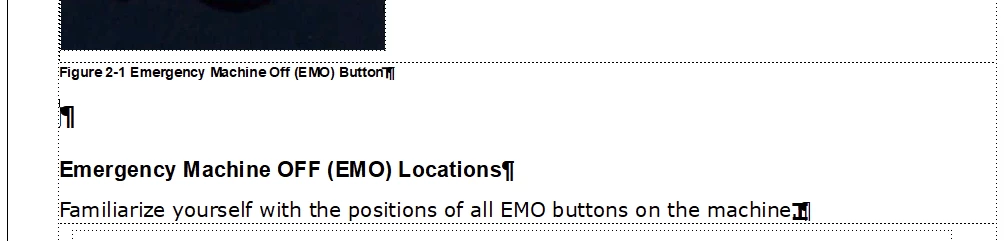
I put the cursor at an insertion point:

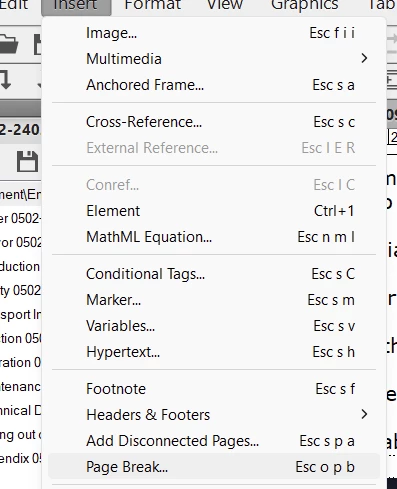
And then I go to Insert/Page Break:

Aaaaaand....Nothing happens.


How do you insert a page break? I just want the figure text to be immediately below the image, and I can't make that happen either no matter how many gymnastics I do.  So my solution is to move the image to the next page! But FrameMaker won't do that either.


Can anyone unlock this magical, mystical, mysterious locked box? So many things in FrameMaker seems to be only known and accessible to experts who charge you for the priviledge of unlocking them!


    This topic has been closed for replies.
    Correct answer Bob_Niland

    Hi Bob,

    Are you saying that there are still features that were relevent and helpful on the UNIX platform that don't translate over well to Windows? 

    I'm old enough to remember UNIX. I cant remember the name of the app I used to create my college papers, but it involved a bunch of tag-like commands at the beginning of the document to get the very basic formatting down. Then I'd procrastinate by playing ULARN, which was like a UNIX-based RPG.

    As for equations, mercifully, no. I do not work with them 🤓


    Susan: Are you saying that there are still features that were relevent and helpful on the UNIX platform that don't translate over well to Windows?

    No, just that there are corridors in the FM House that don't lead to where you probably are trying to go. While the Equation tools still exists, and works, there were a few things it never did. It was never updated to emit equations as EPS, SVG or MathML. Instead, Adobe had an arrangement to use a 3rd-party MathML editor, which may not still even work (bug report FRMAKER-11189). My guess is that the current solution, as with graphics, is to use an arbitrary external MathML editor, and import an XML or SVG object from it.

    Another apprently darkening corridor is Unicode. FM only supports BMP (FRMAKER-10976), which is now only 42.3% of populated Unicode space. This is becoming an increasing annoyance in my work, as the work-around is😱.

    re: I'm old enough to remember UNIX. I cant remember the name of the app I used to create my college papers, but it involved a bunch of tag-like commands at the beginning of the document to get the very basic formatting down.

    Perhaps nroff or troff? I was delighted to dispense with those when FM came along.

    4 replies

    Community Expert
    December 6, 2024

    I can't really see from your screenshot, where you have put the anchored frame. This is a common manner of doing it.

    • Use an anchored frame set to "below current line"
    • Use a dedicated paragraph style for the frame anchor. I usually create a paragraph style called "anchor" which is used for table anchors and graphic frame anchors. I add a background color to the style, so I can quickly see how the text flows.
    • Insert the figure text in the next empty paragraph below the anchored frame
    • When you have an anchor style, you can force that paragraph to "top of page" like the other folks describe in this thread.


    Bjørn Smalbro - FrameMaker.dk
    Susan305351693t3o
    Inspiring
    December 6, 2024

    This seems like a sound idea. But I have a stupid question: How do you create an anchored frame in the Paragraph Designer? I am a relative newbie.

    Also, do you set the style to the graphic itself or to the frame around it, that appears automatically when you insert a graphic?

    Bob_Niland
    Community Expert
    Community Expert
    December 13, 2024

    Susan: But I have a stupid question: How do you create an anchored frame in the Paragraph Designer? I am a relative newbie.

    That operation is not done in Para Designer. The Import you are already doing does that, implicitly, in the currently selected para. Manually, use Insert🞃AnchoredFrame… from the top menu.

    re: Also, do you set the style to the graphic itself or to the frame around it, that appears automatically when you insert a graphic?
    In this context, probably the para. "Style" is a recent FM concept that can applies object-specific catalog attributes to varied objects. A Style assigned for Anchored Frames probably includes not meaningful controls over the anchoring para other than the limited selection of placements.

    frameexpert
    Community Expert
    Community Expert
    December 5, 2024

    What the Page Break command does is popup the Page Break panel where you have to choose a radio button and click Set. Apparently, you didn't notice the panel.


    Susan305351693t3o
    Inspiring
    December 6, 2024

    That window pops up when I right-click in the document, but not when I go to Insert/Page Break. Nothing happens when I do that. I just wonder why it's even there if it doesn't do anything. There are lots of weird things like this in FrameMaker. It's like the Winchester Mystery house of desktop publishing. Long hallways and doors that lead nowhere.

    Bob_Niland
    Community Expert
    Community Expert
    December 6, 2024

    Susan: There are lots of weird things like this in FrameMaker. It's like the Winchester Mystery house of desktop publishing. Long hallways and doors that lead nowhere.

    It's due to the history of the app, which began in the mid-1980s as a Unix-based X-windows WYSIWYG interface to generating PostScript. There was no MS Windows then, nor any PDF, HTML, XML or eBook. Ps is very strict, so people working with it were used to having to architect documents to some degree.

    While being able to cause overrides is likely necessary (if only during format development), having those toolbar buttons, and assorted menu items that routinely generate new overrides willy-nilly, is problematic. I never use them for anything more complex than a one-page single-use memo.

    On the Winchester House theme, I hope you don't need to work with equations…

    Bob_Niland
    Community Expert
    Community Expert
    December 5, 2024

    The Insert🞃Page Break… feature probably needs to flash a warning dialog.

    FM has no data object for a page break.
    What that command does is apply a Pagination override to the currently select paragraph. Not only is this sloppy document stewardship (on FM's part), it's also very fragile, as any number of routine update operation can make it vanish.

    The optimal approach is to ponder the paras in the region, and use Pagination, Keeps, Widows & Orphans, applies to the Formats/Styles as Updates, to have content end up where desired.

    Susan305351693t3o
    Inspiring
    December 5, 2024

    Why is the Insert/Page Break even there?


    It did nothing when I selected it, much less anything to cause sloppy documentation stewardship. It seems like another example of, like I said above, they make things mysterious so that you have to BE an expert or pay an expert to figure out how to do things. 

    Community Expert
    December 6, 2024

    Hi,

    I guess that Rick is right. (See his post below.) When you right-click and select Page Break, it opens a pod with several options (Page, Column, etc.). You have to select one of these and click Set to apply a page break.

    Bob, yes. page breaks could be set in paragraph formats (or accomplished with Keep with Next). However, the need for a page break can vary. E.g. when something gets translated, you might need page break or do not want a page break compared to the original version. You would have to change paragraph formats or apply a page break.

    Best regards, Winfried

    justinr56743
    Participating Frequently
    December 5, 2024

    Try this method, place your text below the image. Place your cursor next to the text. Go to Pagination. Select "Top of Page." This will place the text on another page. 


    Susan305351693t3o
    Inspiring
    December 5, 2024

    Thank you for this. The mystery gets deeper. I did what you said, and it make the issue worse. The problem didn't go away and it seemed to make the gap between the text and the image even bigger. So I did the "undo," and suddenly the figure and the figure text ended up on the same page, which is really what I wanted to begin with. So thank you, the problem solved itself, but I have no idea how. When I hit "undo" i expected that it would go back to what it was before I selected "Top of Page" in the paragraph designer.

    So how DOES one insert a page break? Why is the "page break" under the insert menu if it doesn't do anything?

    justinr56743
    Participating Frequently
    December 5, 2024

    I had the statement "This is the second page" right below the first statement. I put my cursor there and then selected "Page" in the Page Break pod. It moved the line to another page.