Doe Johns
Inspiring
May 5, 2021
Question

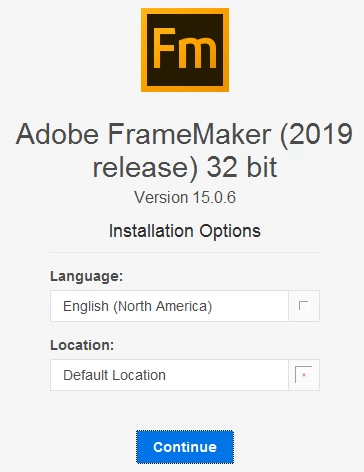
Installation doesn't start

  • May 5, 2021
  • 4 replies
  • 404 views

Windows 7 with SP1, FrameMaker 2019.


When I click Continue button, nothing happens. Changing the language or the location doesn't help. What it could be?

This topic has been closed for replies.

4 replies

pulkitn
Adobe Employee
Adobe Employee
May 7, 2021

Hey @Doe Johns ,

Windows 7 is deprecated and we no longer support Windows 7 OS. If you still think it's something else and not related to OS then kindly mail the team at tcssup@adobe or fmerror-reports@adobe.com , Also attach the installer logs present at "C:\Program Files (x86)\Common Files\Adobe\Installers\Install.log".

Someone will get back to you 

Jeff_Coatsworth
Community Expert
Community Expert
May 5, 2021

Contact the FM folks at Support - see https://helpx.adobe.com/contact/enterprise-support.other.html#framemaker for your support contact options.

Be.eM
Inspiring
May 5, 2021

I remember having the same problem when first installing FM2019 in a Win7 Parallels VM, which I used to keep away from the internet and which was lacking some updates. The reason was an outdated version of the MS Internet Explorer, on which the whole installation process seems to depend. I haven't understood that kind of prerequisite back then, and I still don't really understand it, but updating Internet Explorer was the solution.


Bernd

Doe Johns
Doe JohnsAuthor
Inspiring
May 5, 2021

Bernd, thanks, this helped. Now the installation starts, but then, after about 50% is complete, it stops with error 183. There is a help page, https://helpx.adobe.com/download-install/kb/fix-error-183.html, but I don't see how it really can help me. 


This is very frustrating, to say the least. Any ideas?

Bob_Niland
Community Expert
Community Expert
May 5, 2021

According to this page, FM2019 on Win7 was supported, and I'd expect FM/32 to install on either Win7/32 or Win7/64.
Whether 'tis wise is another matter, given that FM needs network access to authenticate, and Win7 is now dangerously past its last security update (unless you are a large account on extended support). That aside, we are left with the usual suspects:

What object are you installing from? (such as an unpacked .zip)

Are you using an Admin account? (or user account running as admin)

Is there ample storage? (the download alone is a huge object)

What activity or lack thereof is shown in Task Manager for the intall process?