


Inspiring
July 12, 2013
Answered

installation of Technical Communications Suite components fail

  • July 12, 2013
  • 1 reply
  • 1938 views

I've migrated from a laptop with Windows XP to a Windows 7 64 bit laptop. Post migration I re-installed Technical Communications Suite 4. During the installation I get an error that Presenter failed to install because PPT 32 bit is not present. Additionally, Captivate cannot create swf files. Please help resolve these issues.
This topic has been closed for replies.
Correct answer RoxanneM

At this point I don't recall if I had full admin rights or not. My user is a member of the Admiinistrators Group currently, but don't know whether that was the case at install time. I'll try calling and see if I can get some guidance. Thanks for the suggestion.


Alisha in Adobe support was able to resolve the problem:

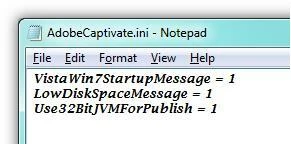
  • Browse to the following location and open the file mentioned : C:\Program Files (x86)\Adobe\Adobe Captivate 6\AdobeCaptivate.ini
  • Add the following tag to the file : Use32BitJVMForPublish = 1 (as shown in the image below)

Also, do the same to the file in the following location : C:\Program Files\Adobe\Adobe Captivate 6 x64\AdobeCaptivate.ini.

This seems to have worked.

1 reply

MichaelKazlow
Legend
July 12, 2013

What version of TCS? What version of Office?

RoxanneMAuthor
Inspiring
July 12, 2013

I'm using TCS 4 with Office 2003. Upgrading office is currently not an option.

Jeff_Coatsworth
Community Expert
Community Expert
July 26, 2013

Did you have local admin rights when you installed TCS4? You may need to uninstall & reinstall it again. If the problem persists, give Adobe Support a call - it's usually a free call for installtion issues.