



nankin
Known Participant
February 26, 2014
Question

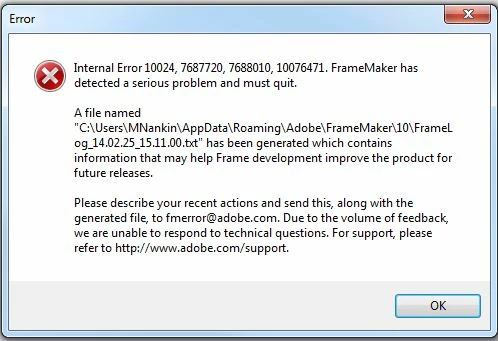
Internal Error 10024, 7687720, 7688010, 1007641 in FM10
  • February 26, 2014
  • 1 reply
  • 1309 views

I have researched this error message on the group thus far and have found no definitive answer. The file named in the dialog box does not exist on my machine. When I receive this error message, no FM files can be opened.

My workaround has been to rename the file I was working on and, after doing this enough times, the error goes away and I can resume work.

Would anyone have any further insight into this error message. Thank you for any help or guidance you can offer.

nankinnankin

    This topic has been closed for replies.

    1 reply

    Arnis Gubins
    Inspiring
    February 26, 2014

    The path shown for the crash log may be in a hidden folder depending upon your login account settings. The folder location is where the individual user preferences are stored by FM.

    As the crash window states, what were you doing when the crash happened?

    Did FM create a recover file? Did you try to use that when you restarted FM? Is this happening with just the one file or at random with any file? etc.

    The details of the error codes in these messages are only known to the Adobe engineers, which is why you are asked to send in the log file along with the description of what you were doing when it happened.

    You might try doing a MIFwash (i.e. save the FM file in MIF format, open the MIF and re-save as binary .fm), in case there is any internal corruption in the FM file. The MIFwash process will tend to clean out things that FM doesn't recognize as valid.

    nankin
    nankinAuthor
    Known Participant
    February 27, 2014

    Hi Arnis,

    Thank you for your response.

    I have revealed the hidden folders and sent the file to Adobe as directed. I was simply opening a file when the crash occurred. There was no recover file.  The error occurs when opening any FM file in any of my books either from my computer or the corporate backup drive. There was no recover file created.

    nankinnankin

    Arnis Gubins
    Inspiring
    February 27, 2014

    When you get a crash, check your consfile.txt file (this is the console window log) located in thee same folder as the FM crash log. This may provide a clue as to what FM was doing (or any error that it encountered) just before the crash.

    Was the crash occurring when you opened the FM file from the book file or when you opened the FM file directly? Are these older FM version files? Have you tried the MIFwash on the files? If the problem is occurring from the book file, have you tried creating a new book file?