
phips243
Participant
July 6, 2017
Answered

Is it possible to add CSS code to layout.css upon generation of FM2017 Responsive HTML5 output?

  • July 6, 2017
  • 1 reply
  • 1134 views

To make clear what I actually mean: By default, Framemaker 2017 seems to prefer square logos only. In the Publish settings for Responsive HTML5 the logo can be defined but not its aspect ratio/size of the container containing it. (Publish > Edit > Responsive HTML5 > General > Manage Layout > Edit > Header).
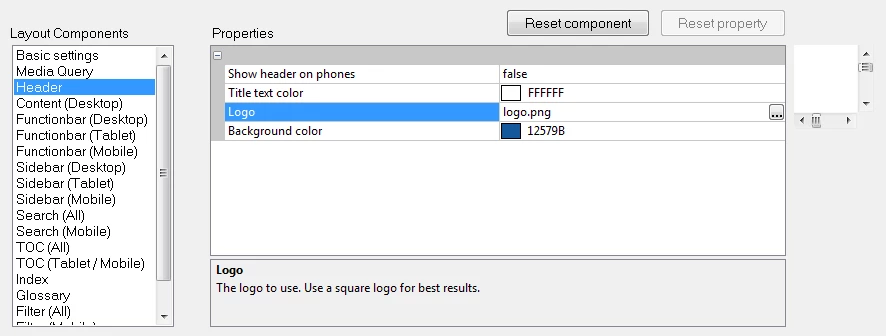
Our company logo however isn't square and so I wanted to widen the "logo" Div-Container that can be found in the index.htm file (<div class="logo" data-attr="title:@KEY_LNG.HomeButton">). The corresponding CSS is to be found in the layout.css file in the \template\Azure_BlueResponsive_HTML5 folder (we are using the Azure_Blue screen layout):

div.header div.logo {

                     background-color:transparent;

                     cursor:pointer;

                     background-image:url("logo.png");

                     background-repeat:no-repeat;

                     background-position:center center;

                     background-size:contain;

}

My first instinct of course was to add an overriding CSS file via the option "Override Styles for this Output" in the Publish settings. My overriding CSS would look like this:

div.header div.logo {

                     width: 150px !important;

                     height:110% !important;

}

This approach however doesn't work. At least not the overriding part. If I add the code to layout.css directly - which of course is only possible AFTER publishing and would have to be done manually every time after I published something - I get the desired result - the logo can be identified without using the Windows magnifier... 😉

So my question: Is it possible to tell Framemaker 2017 to add the additional two lines of CSS code to the layout.css file? Is the CSS file readily stored somewhere "in the bowels of Framemaker" or is it dynamically generated every time content is published? The other approach I could think of would be to use the overriding CSS and address it directly in the <head> portion of the index.htm file like this:

<link rel="stylesheet" type="text/css" href="responsive_html5_!OverrideStyle!/Styles.css">

Of course I'm aware that this would have to be placed at the end of  the <head> portion to override all the other styles.

This topic has been closed for replies.
Correct answer Jeff_Coatsworth

You want to mess around with the originating "factory" source of the generated files - those should be found inside a .slz type file in your installed FM2017 folder - the .slz file for a layout is a zip file; rename it to .zip and you can unpack the files within. After tinkering (always make a backup before you start of the .slz) with the contents, zip it back up, rename it back to .slz and it should kick in when you generate next.

1 reply

Jeff_Coatsworth
Community Expert
Jeff_CoatsworthCommunity ExpertCorrect answer
Community Expert
July 7, 2017

You want to mess around with the originating "factory" source of the generated files - those should be found inside a .slz type file in your installed FM2017 folder - the .slz file for a layout is a zip file; rename it to .zip and you can unpack the files within. After tinkering (always make a backup before you start of the .slz) with the contents, zip it back up, rename it back to .slz and it should kick in when you generate next.

phips243
phips243Author
Participant
July 7, 2017

Thank you very much for the hint. I just found a similar - probably the same solution. I stored the Publish settings in a .sts file ("Save as" in the settings window) and suspected that it actually was an archive file. So I opened it in 7-Zip and altered the layout.css file in the \!ScreenLayout!\Azure_BlueResponsive_HTML5\ folder. I didn't even have to rename/extract the archive. I just right-clicked the layout.css file inside the 7-Zip window, opened it in Notepad (Open with), made the changes and saved it. Upon saving 7-Zip realized the file had been changed and asked whether I wanted to update the archive, which I did. Then I opened the .sts in the FM Publish window (Open) to "import" the settings - not sure whether this step was actually necessary. Afterwards the HTML5 was published as desired. :-)